

Key Takeaways⭐
- Loop engineering describes AI systems that act, check the result against reality, and retry until a task is actually finished, not just attempted once.
- It sits above prompt engineering (how you phrase instructions) and context engineering (what the model can see), governing how many attempts happen, what counts as success, and when to stop.
- The core building blocks are planning, reasoning, tool use, evaluation, memory/state, and stopping conditions. Evaluation is the piece missing from single-shot prompting.
- Feedback comes from two sources: fast, cheap environment feedback (tests, errors, API responses) and slower human-in-the-loop feedback for judgment calls automation can't handle.
- Key engineering challenges include state management, exit conditions, observability, and cost, since extra iterations mean more tokens, tool calls, and time.
- It's not a standardized discipline yet, and prompt engineering isn't replaced by it. It becomes one component nested inside a larger system focused on how that system checks its own work.
What Is Loop Engineering?
If you've spent any time building with AI agents, you've probably hit the same wall: a great prompt gets you a great first answer.
But it doesn't get you a working pull request, a passed test suite, or a research summary you can trust without checking it yourself. That gap between a good response and a finished task is what Loop Engineering tries to address.
It's a term that's picked up steam among developers and AI engineers for a fairly specific pattern.
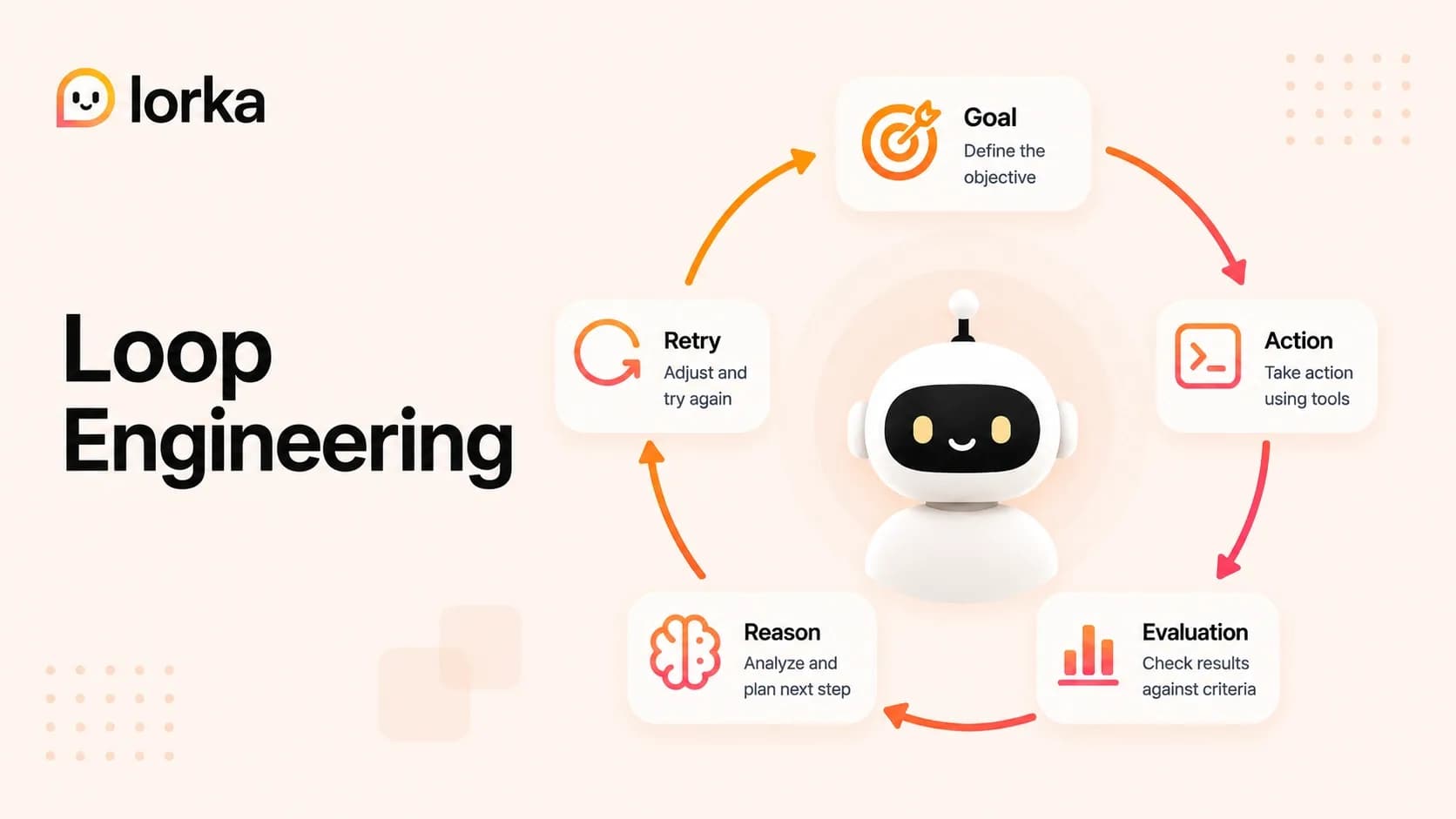
Instead of sending one prompt and taking whatever comes back, you build a system that reasons about a goal, takes an action, looks at what happened, judges whether that got it closer to done, and either stops or tries again with something adjusted.
Read the code, run the tests, check the diff, decide what's next. Repeat until the job is actually finished, not just attempted once.
It's worth being upfront about what this term is and isn't. Loop Engineering is not a certification, and there's no textbook chapter with an agreed-upon definition.
Different teams use it slightly differently, and some of what gets called loop engineering today would just have been called "an agent with a retry loop" two years ago.
The ideas underneath it, though, aren't new. Control theory has had feedback loops for decades, and robotics engineers have been building sense-plan-act cycles for just as long.
What's new is applying that same shape to a model that can call tools, write and execute code, and browse the web on its own and figuring out what breaks when you do.
Prompt Engineering vs Context Engineering vs Loop Engineering
There's a habit in this industry of declaring one discipline dead the moment a new one gets a name.
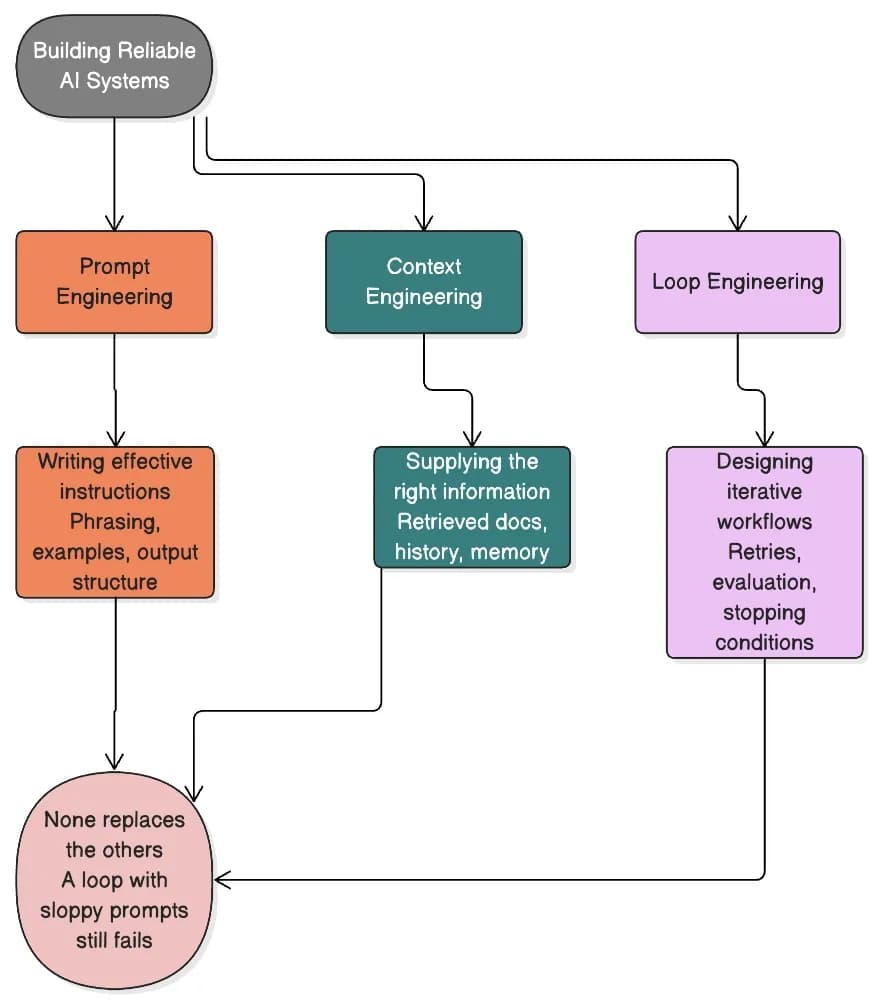
In practice, these three ideas sit at different layers of the same system, and a serious agent architecture needs all of them working together.
Prompt engineering is about the instruction itself: how you phrase a request, what examples you include, and how you structure the output so the model actually follows it.
Context engineering is about what the model can see when it generates that response: the retrieved documents, the conversation history, the relevant file contents, and the tool output from three steps ago.
Loop Engineering sits a level above both.
It governs the workflow that wraps the model call: how many attempts are allowed, what counts as success, what triggers another pass, and when the whole thing should stop and hand control back to a person.
| Discipline | Primary focus |
|---|---|
| Prompt Engineering | Writing effective instructions |
| Context Engineering | Supplying the right information and memory |
| Loop Engineering | Designing iterative workflows that continue until success or failure criteria are met |
None of this replaces the others.
A loop built around sloppy prompts still produces sloppy intermediate steps, just more of them, faster. A loop with no context management keeps re-deriving facts it already knows.
Loop Engineering is really the layer that decides how often prompting and context get invoked, rather than a substitute for either.
Why AI Agents Changed the Conversation
Single-shot prompting works fine when a task fits inside one exchange.
Summarize this memo, draft this email, answer a question about a document you can already see in full. The model has everything it needs, generates a response, and you're done.
It stops working once a task depends on information the system doesn't have yet at the moment it starts. A coding agent has no way of knowing whether its fix is correct until it runs the test suite.
A research agent can't tell whether a source is trustworthy until it fetches the page and reads it. You can write the most careful prompt in the world, and it still won't tell you what the compiler is about to say.
Addy Osmani has written about this under the label Loop Engineering, specifically in the context of coding agents, framing the good ones as running something closer to a tight write-test-debug cycle than a fancy autocomplete.
That framing has stuck for a reason, since it matches what people actually experience when a coding agent works well. But the pattern itself is broader than any single author, tool, or vendor. It shows up anywhere a system needs to act, check the result against reality, and adjust.
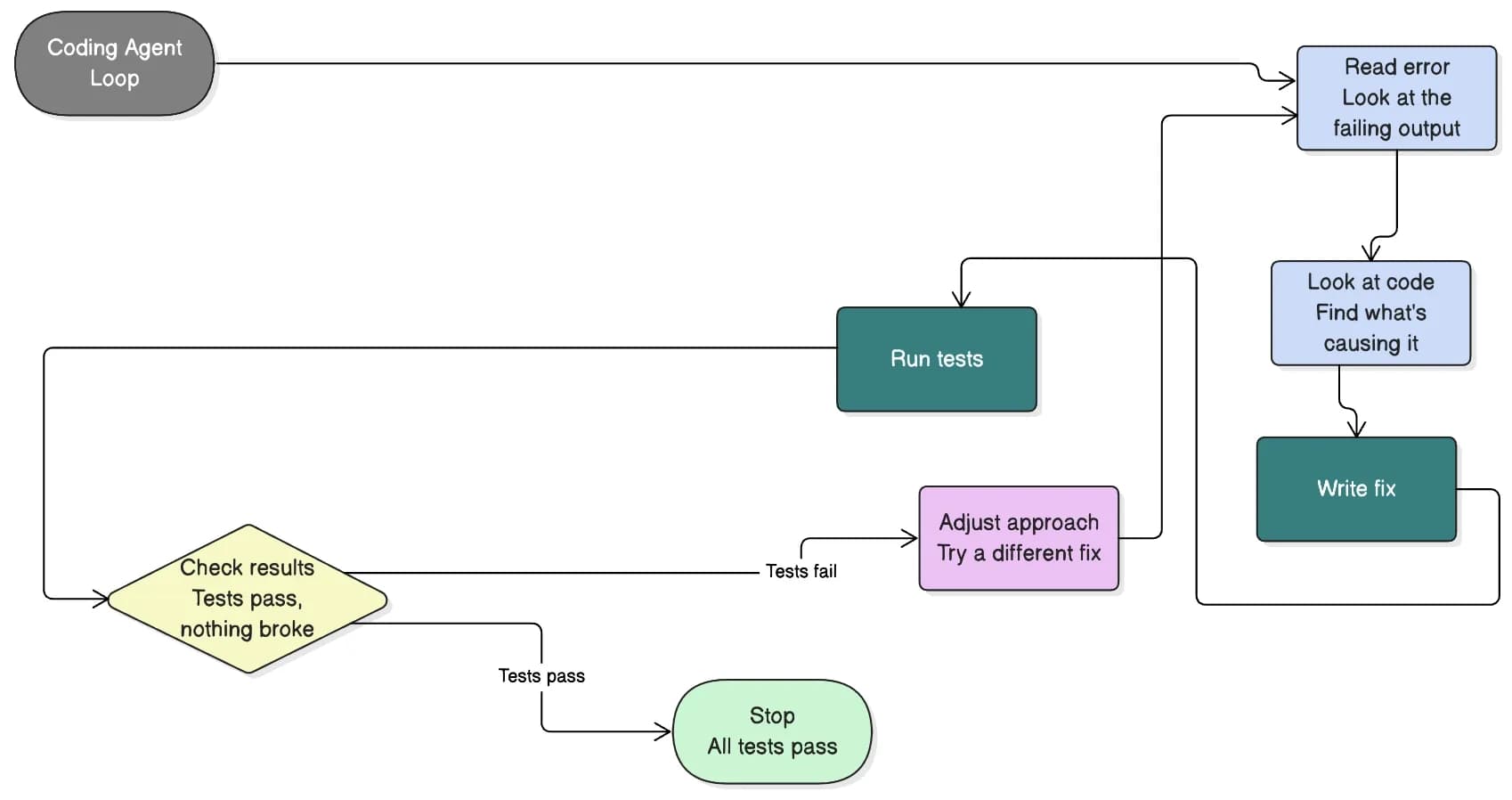
Stripped down, the coding-agent version looks like this: write, test, debug, retry, stop.
Linear Prompting vs Loop-Based Workflows
| Traditional prompting | Loop-based workflow |
|---|---|
| Single request | Multiple iterations |
| Manual retry | Automated retry |
| Static context | Updated context and state |
| Human evaluation. | Automated evaluation, plus optional human review |
| Single API call | Stateful workflow |
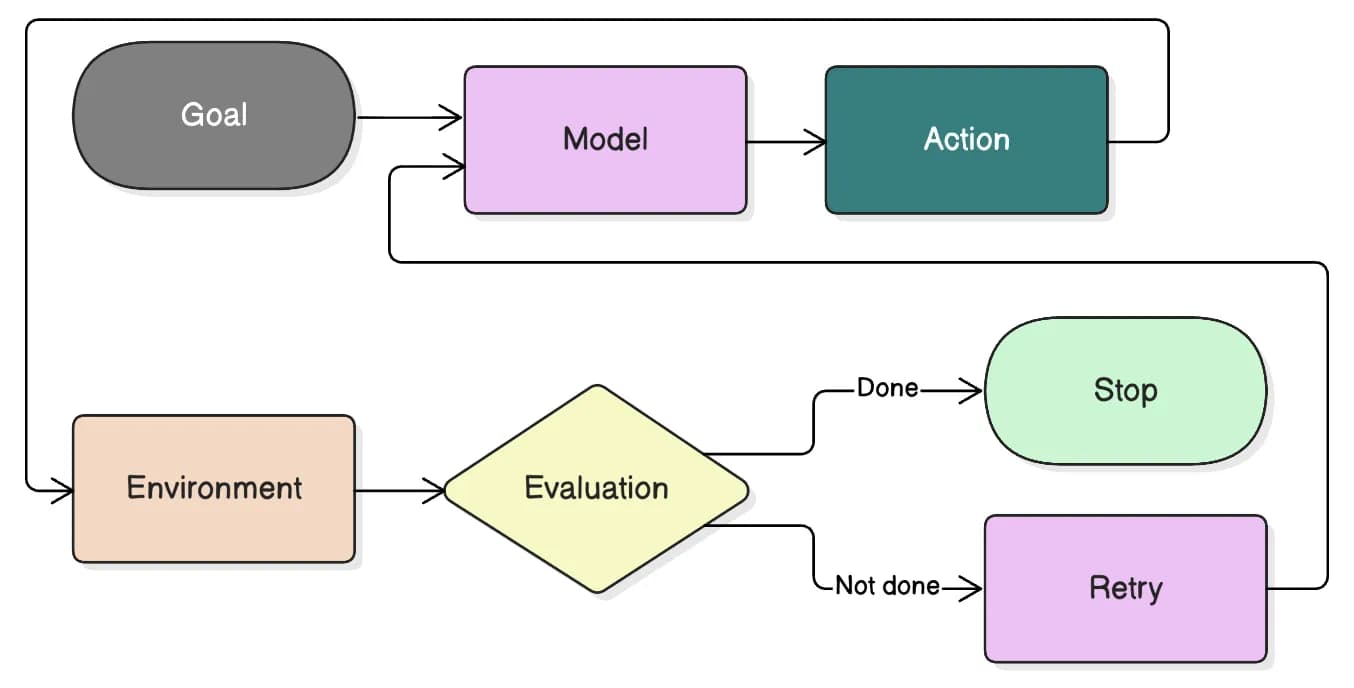
You can also draw this as a flow rather than a table: goal, then the model, then an action, then the environment reacting to that action, then feedback, then evaluation, then a decision, stop or retry.
The part that actually matters in that flow is the evaluation step, because it's the piece missing from ordinary prompting. In a single API call, evaluation happens in a person's head after the fact.
In a loop, evaluation is code, or another model call, or both, and it runs inside the system on every pass, which is what lets the workflow decide for itself whether to keep going.
The Building Blocks of a Loop
Strip away the branding, and most working loops are built from the same handful of pieces:
- Planning breaks the goal down into steps that are actually achievable one at a time.
- Reasoning figures out what to do next given whatever state the system currently has.
- Tool use is how the model actually touches the outside world, running code, calling an API, reading a file, instead of just describing what it would do.
- Evaluation checks whether the last action actually helped.
- Memory and state carry forward what's already been tried so the system isn't relearning the same lesson on iteration six that it learned on iteration two.
- Stopping conditions decide when enough is enough, whether that's success, hard failure, or running out of budget.
The ReAct pattern is probably the most cited academic reference point here, since it formalized interleaving reasoning traces with actions and observations back in 2022.
Worth reading for the original framing, but treat it as one implementation of the idea rather than the definition of it. Plenty of production systems do something structurally similar without ever calling it ReAct.
Ehsanullah Baig
Technical AI Writer
If there's one line worth underlining in this whole section, it's this: without evaluation, a loop is just repetition.
A system that tries the same broken approach five times in a row, never checking whether anything actually changed, isn't getting closer to a goal. It's burning tokens and adding latency while looking productive.
Feedback Loops: Humans vs. Environment
Feedback into a loop tends to come from one of two places, and most real systems end up using both at once.
Human-in-the-loop: Feedback covers approvals, legal sign-off, or someone glancing at an output before it goes out the door.
It's slow, and it costs a person's attention, but it catches the kind of judgment call automated evaluation doesn't handle well yet: tone, risk, and whether something merely looks right versus actually is right.
This guide to human-in-the-loop review walks through where that fits into AI-assisted work more broadly.
Environment-in-the-loop: Feedback is the opposite: compiler errors, failing unit tests, a 400 response from an API, a runtime exception with a stack trace.
It's fast, cheap to run thousands of times, and objective, but it only catches what the environment happens to be built to detect. A test suite with poor coverage will happily pass a fix that's subtly wrong.
A coding agent might lean almost entirely on environment feedback, since tests either pass or they don't. A system generating anything customer-facing or legally sensitive usually needs a human step no matter how confident the automated check is.
Most production systems land somewhere in between, letting cheap environment checks handle the bulk of iterations and saving expensive human review for decisions that actually carry risk.
The Engineering Challenges
Building a loop surfaces problems that don't exist when you're sending one prompt and reading one response.
State management comes first: you need somewhere reliable to track what's already been tried, what happened each time, and what the current plan actually is, and that state has to survive between iterations without silently getting dropped or corrupted.
Exit conditions are trickier than they sound. In practice you're usually combining a few rules: stop after N iterations, stop when the budget runs out, stop when tests pass, and stop once confidence crosses some threshold.
Get this wrong one way and the loop quits before anything's solved. Get it wrong the other way, and it runs forever, quietly burning money with no guarantee the outcome improves.
Observability matters more here than almost anywhere else in software, precisely because the system is running many steps on its own. When something breaks, you need to see which iteration failed and why, not just stare at a final wrong answer with no trail back to the cause.
Cost and latency are easy to ignore until a bill arrives. Every extra iteration is more tokens, more tool calls, and more wall-clock time.
A loop that squeezes out a marginally better answer by running ten passes instead of two might not be worth it if a cheaper two-pass version gets close enough.
Choosing the Right Model for the Loop
There's no single model that wins every loop.
What matters is which trade-offs your workflow cares about: reasoning quality, how reliably it calls tools, latency, cost per call, coding performance, and how much context it can hold onto at once.
A loop running hundreds of cheap iterations against a fast test suite might do better with a smaller, quicker model that's reliable at tool calling, even if its raw reasoning isn't the sharpest available.
A loop making a handful of expensive, high-stakes calls, planning an architecture or tracking down a genuinely gnarly bug, can usually justify paying for something slower with deeper reasoning. None of this is fixed, either, since models keep shifting what they're good at.
In practice, the harder problem often isn't picking a model at all, it's figuring out why a loop is failing in the first place. Is it the prompt, the evaluator, the workflow logic, or the model itself?
The only real way to answer that is running the same workflow against more than one model and comparing what comes back.
This is where a platform like Lorka can help as an experimentation environment, since it lets you swap the underlying model in and out of the same autonomous AI workflow instead of rebuilding the whole thing for every model you want to test.


Build Better AI Loops with Lorka
Test different AI models in the same workflow to compare reasoning, tool use, reliability, and performance.
Try LorkaPractical Example: Building a Coding Agent
Here's what a fairly ordinary coding-agent loop looks like in practice:
- 1️⃣ Read the error message or the failing output.
- 2️⃣ Look at the relevant code and figure out what's actually causing it.
- 3️⃣ Write a fix.
- 4️⃣ Run the test suite against that fix.
- 5️⃣ Check the results: Did the tests pass, and did the fix quietly break something else?
- 6️⃣ If it failed or introduced a new problem, adjust the approach and try again.
- 7️⃣ Stop once everything passes, or once you hit whatever iteration or budget limit you set going in.
Map that back to the building blocks from earlier, and it lines up cleanly: reasoning happens in step two, tool use in step four, evaluation in step five, and the stopping condition is spelled out explicitly in step seven.
None of this needs a fundamentally different model than the one doing the prompting. It needs a workflow built around that model that knows when to keep pushing and when to call it done.
From prompt engineers to loop architects
The job of building reliable AI systems keeps getting bigger than writing a good instruction.
It now regularly includes AI orchestration, evaluation, memory, planning, tool integration, and the iterative execution that ties all of it together, and treating any one of those pieces in isolation tends to produce something brittle.
That doesn't make prompt engineering irrelevant. Every step inside a loop is still, underneath everything else, a prompt going to a model, and a badly written one will still produce weak results no matter how well the loop around it is designed.
What's changed is the scope of the job and the skills it now takes to do well.
Prompt engineering is turning into one component nested inside a larger system, and the discipline of designing that system how it checks its own work, when it tries again, and when it stops, is roughly what people mean when they say "loop engineering."
Frequently Asked Questions on Loop Engineering
No, and it's worth being direct about that. There's no certification body and no agreed standard.
It names a real pattern that shows up constantly in production AI systems, but the vocabulary is still settling, and you'll see it used slightly differently depending on who's writing.