

Key Takeaways ⭐
- An AI agent works to complete a goal by attempting to solve problems for you one task at a time.
- A chatbot, on the other hand, is specifically designed to handle very simple questions, usually answering only one question at a time and responding with the single best answer.
- This does not mean that there isn’t any use for a simple chatbot. For short, simple questions like searching for fixed processes, a simple chatbot might be cheaper and better to use than an AI agent.
- A human should review all AI outcomes, whether an agent or a chatbot. A human should provide feedback to the AI as necessary.
What Is An AI Agent And How Does It Work?
A simple AI agent definition is: a type of software that uses artificial intelligence to complete a variety of tasks in order to reach a goal. Agents are far more advanced than chatbots in that they are able to complete a variety of tasks autonomously. Some examples of what an AI agent can do for you include:
-
Automating repetitive tasks
-
Analyzing data
-
Organizing information
-
Drafting and sending emails, IMs or texts
-
Solving problems in bookkeeping, customer service, technical support, human resources or purchasing
AI agents, explained simply, complete tasks by figuring out the steps required to reach a goal and then executing those steps one by one. Sometimes the agent will even have to change course as it progresses. As noted, a chatbot does not operate in this fashion, providing only a single answer after having executed a single process. The complete series of steps executed by the AI agent can even be reviewed by the human who interacted with it to complete a task.
The AI Agent Loop
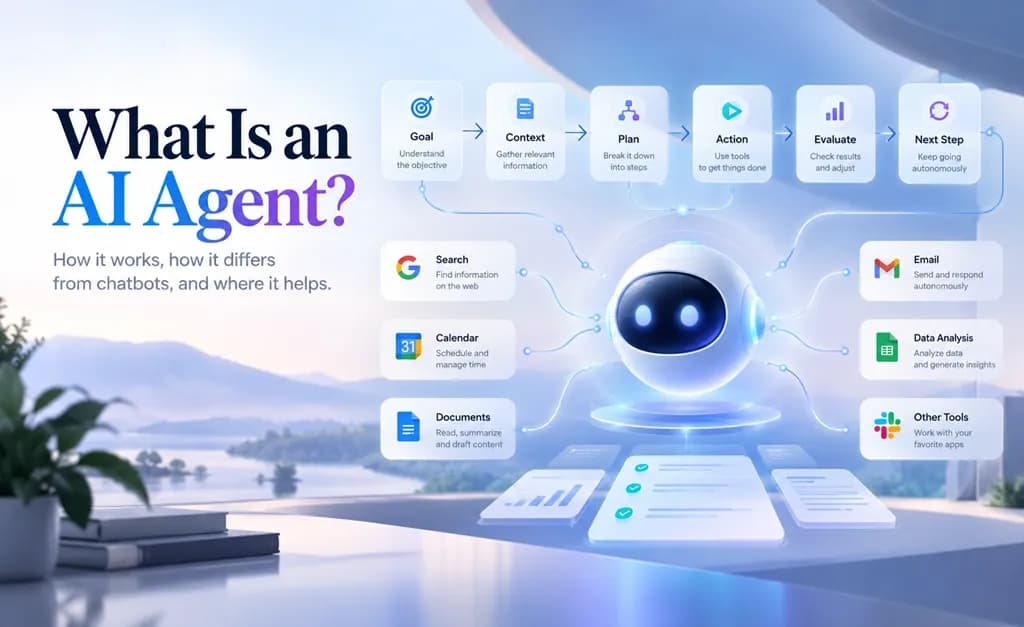
An AI agent can complete multiple steps for a task, whereas an AI chatbot usually completes only one action. This is because an agent works in a loop of thinking, acting and evaluating the results of its actions until it feels it has completed the requested task. Some newer chatbots can handle more advanced, multi-turn conversations, but these are usually still limited to responding to a user as opposed to prompting the conversation to continue itself.
This AI agent loop is represented by the following phases:
Goal → Context → Plan → Action → Evaluation → Next Step / Stop
| Phase | Core Function | Description | Example |
|---|---|---|---|
| Goal | Objective Setting | Sets the goal based on the target (command) from a user or system. | "Find 3 flight options under $500 for next Tuesday." |
| Context | Information Gathering | Receives and pulls in background information from prompts, files, databases and other approved sources. | Verifies preferences, dates, airport and passport information for the user. |
| Plan | Strategy & Decomposition | Maps the goal to a sequence of tasks that can be completed using an LLM. | 1. Search flight APIs. 2. Filter by price (under $500). 3. Select top 3 options. |
| Action | Execution | Executes web/API searches across various external tools, APIs, calendars, databases and systems. | Performs web/API searches across various airline platforms to retrieve latest flights. |
| Evaluation | Progress Verification | Verifies the outcome of the executed action to determine if the Goal was moved closer to completion or not. | Verify that at least 3 flights have been found and that all of them are below $500. |
| Next Step / Stop | Iteration or Hand-off | Checks whether further action is required, such as repeating a step, trying a different approach, asking for human intervention or finishing the action. | If valid: Presents options to user. If prices are too high: Change search criteria or ask user for a higher budget to proceed. |
Human assistance and the AI agent loop
The amount of human assistance required will depend on the specific AI agent and its corresponding goals. For example, an agent that assists with financial or legal matters will typically require more human oversight than an agent assisting customers with returns. The amount of human assistance required for an agent typically correlates to the level of sensitivity of the tasks that the agent is attempting to complete.
Some AI agents are designed to be more independent of humans than others. This type of AI is often called agentic AI and can act entirely or somewhat independently of humans.
AI Agent vs Chatbot vs Automation
Similar processes may be implemented by different types of systems: AI agents, chatbots and automation, to name some of the most common ones. Below is a list to summarize the main differences.
| Type | Main Job | Decision-Making | Can Use Tools? | Example |
|---|---|---|---|---|
| Chatbot | Answers questions or generates text content | Limited to the current conversational prompt | Sometimes | Explaining a complex issue to someone or write out a quick email. |
| Automation | Repeats a strict, predefined process | Follows fixed "if-this-then-that" rules | Yes | Sending an email reminder automatically when a form is submitted. |
| AI agent | Pursues an overarching goal through multiple steps | Within limits, it can choose and fine-tune subsequent steps to better reach its end goal | Yes | Researching options, then creating a report or requesting manager approval. |
One good way to figure out whether you’re working with an AI agent vs automation vs chatbot is to ask the question: who chooses the next step?
- Automation: A rule written in advance
- Chatbots: A person
- Agents: The AI system itself
AI agent vs LLM
Many AI implementations, such as chatbots and automation tools, are often mistaken for Large Language Models (LLMs) in action. In reality, LLMs are used as the underlying machine learning to enable the language and planning capabilities to create output for these systems. However, they do not complete actual tasks. Instead, they generate responses based on the large corpus of text that they were trained on.
In particular, agentic behavior is the key difference between an AI agent and an LLM: the AI agent has goals, contexts, tools and logic to independently act to complete tasks, whereas the LLM is a means to provide more information to help the AI agent complete a task for a user.
Examples of AI agents
Several types of AI agents exist, though they often serve rather different goals and tasks. However, the overarching commonality is that the AI agent performs repetitive parts of a task, while humans handle high-risk decisions and judgment. Here are just a few examples:
| Agent Type | Core Objective | Workflow & Capabilities | Escalation Trigger | Workspace Example |
|---|---|---|---|---|
| Customer Support agent | Resolve routine customer inquiries and manage ticket volumes. | Reads incoming tickets, searches the help center for answers and composes appropriate responses in emails and chats. | Case is sensitive, highly specific or involves account cancellations/disputes. | Custom Helpdesk Automation — Searches company knowledge bases and auto-resolves routine requests. |
| Research agent | Gather multi-source information and compile actionable insights. | Performs research on given topics and organizes the results found in web sources or internal documents into clearly structured summaries. | Requires human review to verify sources and validate conclusions before publication. | Web Search & PDF Agent — Scours live web sources or dense PDF documents to generate cited briefs inside one workspace. |
| Scheduling agent | Schedule meetings or appointments with multiple parties. | Checks all connected calendars for conflicts and suggests optimal time slots taking into account time zones and exceptions. | Before sending a meeting invitation to participants’ calendars, pause for human confirmation. | Enterprise Calendar Assistant — Resolves scheduling conflicts and finds optimal meeting times across multiple calendars. |
| Operations & Content agent | Triage incoming data, route requests and execute backend actions. | Monitors forms and internal tools to process incoming workspace requests, create tasks and send corresponding messages. | Program encounters exceptions, custom business logic or missing required fields for forms and internal tools. | Multi-Model Workflow — Uses multi-model reasoning to analyze documents, translate text and draft responses for review. |
When AI Agents Help (And When They Don’t)
The above types of processes can benefit from an AI agent. However, not all tasks should be done with an AI agent. Sometimes, basic questions can be answered by a chatbot, and other times, there are processes that can be completely fixed and controlled by automation. Some processes are even better to allow humans to complete and then review instead of having the AI make a decision for them due to high stakes or sensitivity.
Good Fit
- Multi-step, repetitive tasks with a similar pattern
- Information gathering and formatting
- Workflows that have clear rules and goals
- Workflows with few exceptions that humans can handle after completing
Not Always a Good Fit
- Clear, simple questions that chatbots can easily answer
- Fully fixed processes that automation can handle
- High-stakes and highly sensitive information and processes that require human decision-making and judgment (such as certain legal, medical, financial or security tasks)
- Tasks with unclear goals or that need several permissions
No matter what type of AI you use, even non-sensitive work should go through human eyes at some stage. Given that AI can go wrong in so many ways (mistakes, hallucinations, misunderstanding the question or crashing), even the most autonomous of agents are generally reviewed by a human somewhere in the workflow.
Explore AI Workflows With Lorka
AI agents often rely on AI models for planning, reasoning, communicating and other tasks. However, different AI models are better at different sorts of tasks. For instance, Gemini may be best for general research, while ChatGPT may be best for math-related tasks.
Lorka can help you compare how different models handle tasks such as research, writing and problem-solving in one workspace. This tool lets you compare AI responses and choose the best model for certain tasks before building or automating any processes.


Find a Smarter Way to Work with AI
From simple tasks to complex workflows, getting the most out of AI starts with the right approach. Explore your ideas with Lorka before putting them into action.
Get Started with Lorka AIFrequently Asked Questions
An AI agent completes one or more tasks and achieves a goal. Examples of the tasks that an AI agent can complete are planning, using tools, verifying results and deciding on what steps to take next. Most work by using an LLM to provide the basic information needed to perform a task, then actually performing that task using agentic AI.