

Key Takeaways ⭐
- GPT-6 Astra, Sol, Luna and Terra are four models in one family, each built for a different level of work.
- Luna is the lightweight option for quick questions, short drafts, summaries, and brainstorming, and it’s the GPT-6 model on Free and Go.
- Sol is the everyday choice for serious work: research, document analysis, coding, and professional reasoning sit comfortably here.
- Terra suits daily writing and computer use, and Astra is for complex, connected, high-impact, multi-step workflows, where it earns its place.
- Access depends on plan and product surface. Chat, Work, Codex, and the API don’t always offer the same models, and rollouts change.
What is GPT-6 Actually?
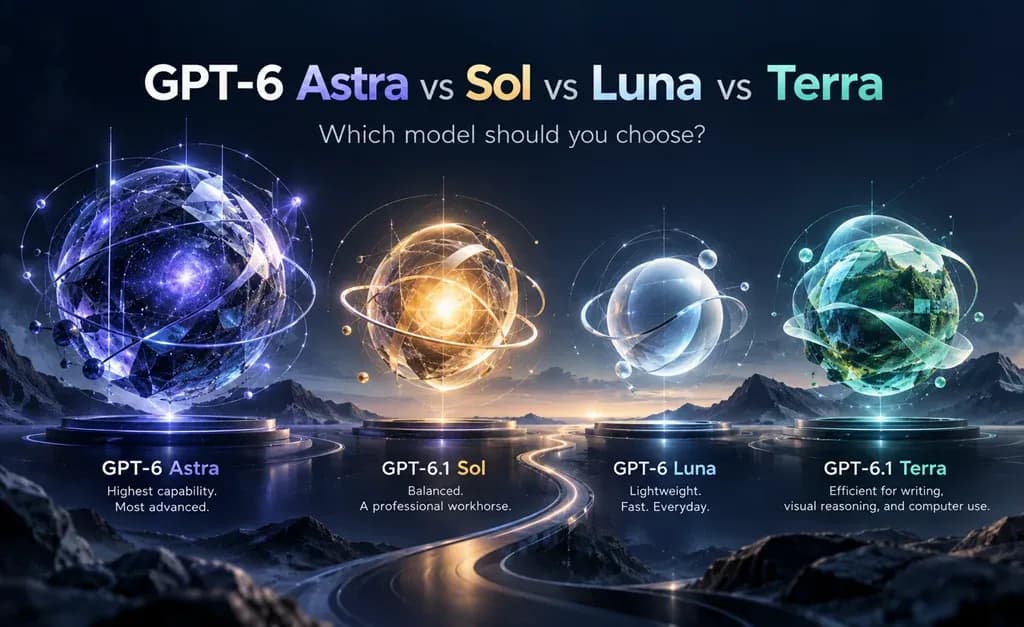
GPT-6 is a family of OpenAI models, not one single model. Astra, Sol, Terra, and Luna sit at different points on the scale of capability, speed, and cost.
So what’s the difference between GPT-6 Astra, Sol, Terra, and Luna? Mostly, it's how much depth each one brings to a task and who gets access to it.
If you’ve opened ChatGPT recently, you’ve probably seen the names without much explanation. One day there was a new model in the picker. A few weeks later there were three.
That’s because OpenAI released the family in stages. GPT-6 Astra arrived first, in early September 2026. GPT-6 Sol and GPT-6 Luna followed later that month.
The lineup has kept moving since. OpenAI shipped GPT-6.1 Sol as an upgrade to Sol. In October, it brought GPT-6 to the ChatGPT Chat tab for every plan, from Free to Enterprise.
After the releases of Sol and Luna, in October 2026 OpenAI released GPT-6.1 Terra.
All three models come from the same generation and the same training approach. What changes is the balance between capability, speed, and cost.
It also helps to know where you’ll meet them. GPT-6 appears in ChatGPT’s Chat tab, in ChatGPT Work for longer task-based projects, in Codex for software work, and in the OpenAI API for developers.
A model can be available in one of those places and missing from another. That’s why model access depends on the current plan and product surface, not just the model name.
If the underlying technology is new to you, our guide to large language models covers how these systems work.
Here’s the family at a glance:
| Model | High-Level Role | Useful Starting Point | Official Source |
|---|---|---|---|
| GPT-6 Luna | Lightweight, fast, and everyday tasks | Quick questions, short drafts, summaries, lists, brainstorming | OpenAI: Sol and Luna |
| GPT-6.1 Sol | Strong performance for advanced work at a lower cost than Astra | Research, document analysis, professional reasoning, debugging, technical tasks | OpenAI: GPT-6.1 Sol |
| GPT-6 Astra | Highest-capability GPT-6 model | Complex reasoning, advanced workflows, difficult technical or professional work | OpenAI: GPT-6 Astra |
| GPT-6.1 Terra | Efficient model for writing, visual reasoning, and computer use | Drafting proposals, interpreting screenshots, filling out forms, and working across supported apps | OpenAI: GPT-6.1 Terra |
Read across the rows, and one thing stands out. None of these is simply “the best.” Each one is best for a certain kind of job.
GPT-6 Luna: The Quick, Everyday Option
GPT-6 Luna is the lightweight member of the family, built for fast, everyday tasks with a clear goal.
Is GPT-6 Luna free? Yes, based on current plan information. It’s the GPT-6 model that Free and Go users can access, both in the ChatGPT desktop app and in the Chat tab.
OpenAI describes Luna as fast and efficient for everyday work at scale. In practice, that means the small jobs that fill a normal day.
Quick questions. Short emails and replies. Summaries of notes or short articles. Outlines, lists, and simple plans. A round of brainstorming when you’re stuck on a name or an angle.
None of those tasks need long reasoning. They need a clear answer, delivered quickly, that you can check at a glance. That’s Luna’s home ground.
Where it starts to struggle is length and tangle. Hand it a long report with conflicting figures or a bug that spans several files, and the answers can get thin.
A simple signal helps here. If you’re correcting the same answer twice, it’s time to step up to Sol.
Usage limits still apply on Free and Go, and rollout timing can vary by account.
GPT-6.1 Sol: The Workhorse for Professional Work and Coding
GPT-6 Sol sits in the middle of the family, with more depth than Luna for research, analysis, and code.
For many people, Sol will be the default for serious work. On paid plans, it’s also the model powering GPT-6 in the Chat tab.
This is the model for tasks that need reading and thinking, not just writing. Pulling findings out of several sources. Working through a long PDF or contract. Comparing options for a project and laying out the trade-offs.
Which GPT-6 model is best for coding? For most everyday coding work, Sol is the natural place to start. It handles debugging, code review, and feature work without the weight of Astra.
Sol has also moved quickly. GPT-6.1 Sol is an upgraded version aimed at coding, computer use, and professional work. It plays the same role in the family, just with more headroom.
The practical upshot is that Sol now covers a lot of work people once saved for top-tier models. That makes the Astra decision more interesting, not less.
GPT-6.1 Terra: For Writing, Visual Tasks, and Computer Use
GPT-6.1 Terra combines clear writing, visual reasoning, and computer use in a fast, efficient model.
When is Terra worth using? Try it when you need to draft a proposal, interpret a screenshot, or fill out a form using information from source documents.
It also suits focused code fixes with clear requirements. For the most complex coding tasks, Sol or Astra remains a better starting point.
Terra is useful when you want capable results while managing speed and cost. OpenAI says your usage allowance covers more tasks with Terra than with Sol or Astra in ChatGPT Work and Codex.
GPT-6 Astra: When the Work Is Genuinely Hard
GPT-6 Astra is OpenAI’s highest-capability GPT-6 model, built for complex reasoning and long, multi-step workflows.
When is Astra worth using? When the task has many connected parts, high stakes, or real ambiguity, and a shallow answer would cost you.
Think of a plan built from a dozen requirement documents. A workflow with several dependencies that all need to line up. A decision where the reasoning matters as much as the conclusion.
OpenAI’s own framing is useful here. It says the most demanding projects still call for Astra, while everyday work happens “at different scales, rhythms, and budgets.”
That second half is the part people skip. Astra is the most resource-heavy model in the family, so it makes sense to save it for work that needs it.
Pro, Business, and Enterprise plans also get access to a more intensive Astra Pro mode, according to OpenAI’s launch post. On Enterprise, Astra is off by default until a workspace admin enables it.
Astra vs. Sol and Terra vs. Luna: Where the Lines Sit
The line between each pair of models is about depth, and you can usually feel it in the shape of the task.
Start with Astra vs. Sol, since it’s where most people hesitate. Sol is strong, so what does Astra add?
Mostly, it holds more pieces together at once. Analyzing one report, fixing one bug, or comparing three options is Sol territory. Combining several documents into a staged plan, or reviewing a workflow where every step depends on the last, leans toward Astra.
If Sol’s answer misses the links between ideas or treats connected problems as separate ones, that’s your cue to try Astra.
Sol vs. Luna is simpler. Luna is right when you already know what you want and just need it done. Sol is better when the task needs reading, reasoning, or code.
Terra adds another option for everyday professional work. It focuses on clear writing, understanding images and screens, and completing tasks across supported apps.
For example, “Turn these notes into five bullet points” is a Luna starting point. “Review these screenshots and update the matching records” is a Terra starting point. “Combine these reports into a plan and resolve conflicting requirements” points toward Sol or Astra.
A useful test: would you need to think hard about this yourself? If the answer is yes, start with Sol.
Which GPT-6 Models Can You Use on Your Plan?
GPT-6 access depends on your ChatGPT plan, the product surface you’re using, and where a rollout has reached.
GPT-6 Free vs Go vs Plus vs Pro comes down to this. Free and Go get Luna. Plus opens up Luna, Sol, and Astra. Pro gives expanded access to all three, which suits heavy research and coding.
Work accounts add one more layer: admin settings. A company or school can switch certain models on or off, which is why two people on the same plan type can see different pickers.
The table below is based on OpenAI’s announcements and its ChatGPT pricing page as of October 2026. It’s a practical overview, not a replacement for official plan documentation.
| Plan / Surface | GPT-6 Luna | GPT-6.1 Sol | GPT-6.1 Terra | GPT-6 Astra |
|---|---|---|---|---|
| Free | Available in Chat and the desktop app, subject to rollout | Not currently available | Not currently available | Not currently available |
| Go | Available in Chat and the desktop app, subject to rollout | Not currently available | Not currently available | Not currently available |
| Plus | Available | Available; powers GPT-6 in Chat | Available: Work and Codex | Available, subject to rollout |
| Pro | Expanded access | Expanded access; powers GPT-6 in Chat | Available: Work and Codex | Expanded access, plus Astra Pro |
| Business | Available in Work and Codex | Available; powers GPT-6 in Chat | Available in Work and Codex, subject to workspace permissions | Available, subject to rollout |
| Enterprise | Available, subject to admin settings | Available, subject to admin settings | Available in Work and Codex, subject to workspace availability and admin controls | Off by default; admins can enable it |
| Edu | Available in Work and Codex | Available in Work and Codex | Available in Work and Codex, subject to workspace permissions | Verify current access |
| API / developers | Available | Available | Available | Available |
Access isn’t fixed, and it rarely changes in only one place. It can differ by product surface, region, account type, plan, administrator settings, and rollout stage.
OpenAI also tends to release models gradually. A model missing from your picker today may simply not have reached your account yet.
So before you build a workflow around a specific model, check the official model page or your current ChatGPT plan. The OpenAI Help Center is the place to confirm anything unclear.
Weighing an upgrade? Our ChatGPT Plus vs Pro comparison and our look at whether ChatGPT Plus is worth it go into the plan side in more detail.
Choosing a GPT-6 Model by Task
Choose the model based on the task. Start with the least complex model that can do the work well, and move up only when you need more depth.
Which GPT-6 model should I use? It depends less on the model and more on what you’re asking it to do. Here’s how that plays out across common types of work.
Coding
Terra suits focused fixes with clear requirements. Sol is a starting point for debugging, code review, and feature work. Think about using Astra for difficult projects with many files or dependencies. Luna can handle focused coding questions.
Research
Sol reads, compares, and summarizes several sources with care. Astra is worth it when the research feeds a major decision or spans many conflicting documents. Either way, check claims against the original source, which is the idea behind grounding in AI.
Professional work
Reports, proposals, and analysis sit comfortably with Sol and Terra. Complex, high-stakes projects, like a multi-team plan built from many inputs, are where Astra earns the extra effort. Our guide to writing business proposals with AI shows the process in practice.
Everyday tasks
Meal plans, short emails, to-do lists, quick explanations. Luna handles all of it. Our ChatGPT productivity prompts are a good place to start.
Still unsure? Ask three questions. Is the task short and easy to check? Start with Luna. Does it involve documents, data, research, or code? Start with Sol or Terra. Are there many steps, sources, or constraints? Use Astra.
Then add a fourth: is that model available on your plan and surface? If not, use the best option you have and review a little more carefully.
Here’s how that looks with specific tasks:
| Task | Good Starting Model | Why | Helpful Guide |
|---|---|---|---|
| Turning meeting notes into an action list | Luna | Short, clear, and easy to check | Productivity prompts |
| Drafting a proposal from an approved outline | Terra | Everyday professional writing with clear source material | Business proposals with AI |
| Analyzing a report and creating an executive summary | Sol | Needs careful reading and solid reasoning | Chat with PDF |
| Debugging a technical issue | Sol | Needs code understanding and step-by-step logic | How to write a prompt |
| Developing a multi-stage plan from several documents | Astra | Many inputs, requirements, and moving parts | What is RAG? |
| Reviewing a complex workflow with dependencies | Astra | Needs deep reasoning across connected steps | AI agent orchestration |
A Practical Example: One Project, Four Models
It’s easier to see how the models split the work in a real project than in the abstract. Here’s roughly how a quarterly business review might run:
- You paste in rough notes from three team meetings and ask for a clean list of updates and owners. Luna handles this in seconds.
- You upload the quarterly sales report and ask for the main trends, risks, and an executive summary. Sol reads it properly and explains what moved.
- You provide dashboard screenshots and ask which charts need clearer labels. Terra is a starting point for the visual review.
- A dashboard number doesn’t match the report, so you ask for help tracing the formula that feeds it. Sol works through the logic step by step.
- Leadership wants a staged plan for next quarter that accounts for budget, hiring, three product launches, and a supplier delay. Astra keeps all of those constraints in view at once.
- You ask for a short summary email to send the team once the plan is agreed. Luna or Terra are the go-to models.
- Before anything goes out, you check the figures, the claims, and the plan against the source material. You do this part.
The project gets done faster because each step uses the right amount of model, not because every step uses the biggest one.
Where Picking the Wrong Model Costs You
The common mistakes in choosing a GPT-6 model aren’t dramatic. They’re small habits that waste time, usage, or trust.
Using Astra for everything is the most common one. It feels like the safe choice, but on a simple task it’s often slower and heavier than you need. You spend more and get roughly the same answer.
Working with Terra for every coding project ignores differences in complexity. Terra suits focused fixes, while OpenAI recommends Sol or Astra for the most complex coding tasks.
Staying on Luna for hard work is the opposite problem. The answers come back fast, look tidy, and miss the point. If you keep rewriting them, the model is telling you something.
Assuming access is the same everywhere causes quieter trouble. A model you use in Codex may not be in your Chat tab, and a colleague’s workspace may have different settings from yours.
Relying on old plan information is close behind. Model access has changed several times in a few weeks, and it will keep changing.
Skipping review is the one with real consequences. Every model can state something confidently and be wrong, a failure mode known as AI hallucinations. A more capable model makes this less frequent, not impossible.
A more capable model doesn’t remove the need for fact-checking, testing, or human review. It just gives you a better first draft to check.
Getting Better Results From Any GPT-6 Model
How you ask matters almost as much as which model you pick.
OpenAI’s own model guide for the GPT-6 family recommends giving the model a clear assignment. That advice holds whether you’re using Luna or Astra.
In practice, a clear assignment covers four things. What you want and who it’s for. The context the model needs, like notes, files, or background. The limits, such as length, tone, or format. And what a finished answer looks like.
That last one gets skipped most often. Telling the model what “done” means saves a round of back and forth.
A well-written prompt often gets a better result from Luna or Sol than a vague one gets from Astra. Our guides on how to write a prompt and use ChatGPT effectively go further.
Comparing GPT-6 Models Side by Side in Lorka
Different GPT-6 models can produce different results for the same task, and reading about them only gets you so far.
Lorka lets you compare models in one workspace. That makes it easier to see when Luna is enough, where Terra excels at writing and visual tasks, how Sol adds useful depth, and when a complex project calls for Astra.
The simplest approach is to run the same prompt across models and judge the results on your own work. You’ll learn more from one side-by-side test than from any spec sheet.
You can browse the full lineup on our OpenAI models hub, including earlier releases like GPT-5.6.


Choose the Right GPT-6 Model for Your Task
From quick drafts to complex projects, find the GPT-6 model that fits your needs—or even combine it with other leading models—to turn your ideas into results without switching tools.
Try GPT-6 on Lorka NowMatching the Model to the Work
So which GPT-6 model should you choose? The one that fits the task in front of you, not simply the most capable one available.
Luna is right for lighter tasks. Terra is ideal for everyday writing, visual tasks, and computer use. Sol suits demanding professional work and coding. Astra is there for the most complex, connected workflows.
Which ChatGPT model is best, then? There isn’t one answer. The best model is the one that matches your task, your plan, and the level of review the work needs.
Access will keep shifting as OpenAI rolls out updates, so check what your plan and product surface allow before you commit to a workflow.
The people who get the most out of GPT-6 probably won’t be the ones who always pick the biggest model. They’ll be the ones who start small, step up when the work demands it, and keep reviewing what comes back.
If you want to see how the three models handle your own tasks, you can compare them side by side in Lorka.
Frequently Asked Questions on GPT-6 Astra, Sol, and Luna
They’re built for different levels of work. Luna handles quick, everyday tasks. Sol takes on more demanding professional work and coding. Astra is the most capable option for complex, multi-step workflows. Terra offers stronger document and visual analysis.