

Key Takeaways⭐
- RAG enhances AI by allowing access to up-to-date information beyond training datasets through external data sources.
- The use of vector embeddings improves the relevance of retrieved information by measuring semantic relationships between concepts.
- RAG addresses issues like hallucination, outdated knowledge, and lack of expertise in specialized areas.
- Grounding answers in actual source material increases trustworthiness and allows for citation of information.
- Effective RAG implementations require careful consideration of chunking strategies and embedding models to optimize performance.
Think about the best librarian you've ever met.
Not the one who shushes you for whispering too loudly, but the one who knows every book you need and many other options. You walk up with a vague question about "that book on medieval economics, the one with the blue cover," and somehow they know exactly which shelf to check.
Such knowledge isn’t wizardry or savant-level memorization.
They understand the structure of the library, the relationships between topics, and how to navigate from your messy question to the right answer.
RAG transforms your AI into that librarian.
Large language models are impressive, but they have a fundamental limitation: they only know what was baked into their training data. If you ask about your company's Q3 sales numbers or your internal security protocols, then they're completely blind.
They'll either admit ignorance or, worse, confidently fabricate something plausible. Neither outcome is useful. Retrieval-Augmented Generation (RAG) connects these models to external knowledge.
Instead of relying solely on what the model "memorized" during training, RAG retrieves relevant information from your actual data before generating a response. The model becomes a librarian with access to your library, not just its memory.
The term itself comes from a 2020 paper by Patrick Lewis at Facebook AI Research. He's since admitted the acronym wasn't their best work. "We definitely would have put more thought into the name had we known our work would become so widespread."
The unflattering name stuck anyway.
Your Brain Already Works This Way
To understand how RAG actually finds relevant information, you need to understand vector embeddings. And the easiest way to understand embeddings is to notice that your brain already works like this.
I'm autistic, and one thing I've noticed about how my mind processes information is that concepts don't live in isolation.
If I think about lavender, I don't just retrieve a dictionary definition. I smell it. Then I remember a lavender-lemon candle I had years ago. Now I'm seeing my first apartment, the layout, the foldable chair I destroyed my posture in, the stress of that period, and the food I was eating.
One concept triggered a cascade of related memories connected by meaning and association, not rote definitions or alphabetically sorted data points.
Vector embeddings work exactly like this.
When RAG processes your documents, it converts text into numbers with coordinates in an abstract plane. This is not the same as a filing cabinet or an x-y coordinate map, but rather a 768-dimensional map of meaning.
The system measures relevance by calculating how close two concepts sit in this space.
In this world, "doctor" and "physician" sit right next to each other because they mean similar things. On the other hand, "Doctor" and "Dr. Pepper" are located continents apart.
Concepts that are positioned next to each other represent closely related ideas. Concepts on opposite ends are completely unrelated.
This phenomenon is why semantic search finds answers that keyword search misses.
When you search for "laptop issues," the system retrieves documents about "notebook computer problems" because, in embedding space, these concepts are close to each other even though they use different words.
| Search Type | How It Works | Limitation |
|---|---|---|
| Keyword | It matches exact words | "Laptop" won't find "notebook computer" |
| RAG | Matches meaning via embeddings | Finds related concepts regardless of wording |
How RAG Actually Works
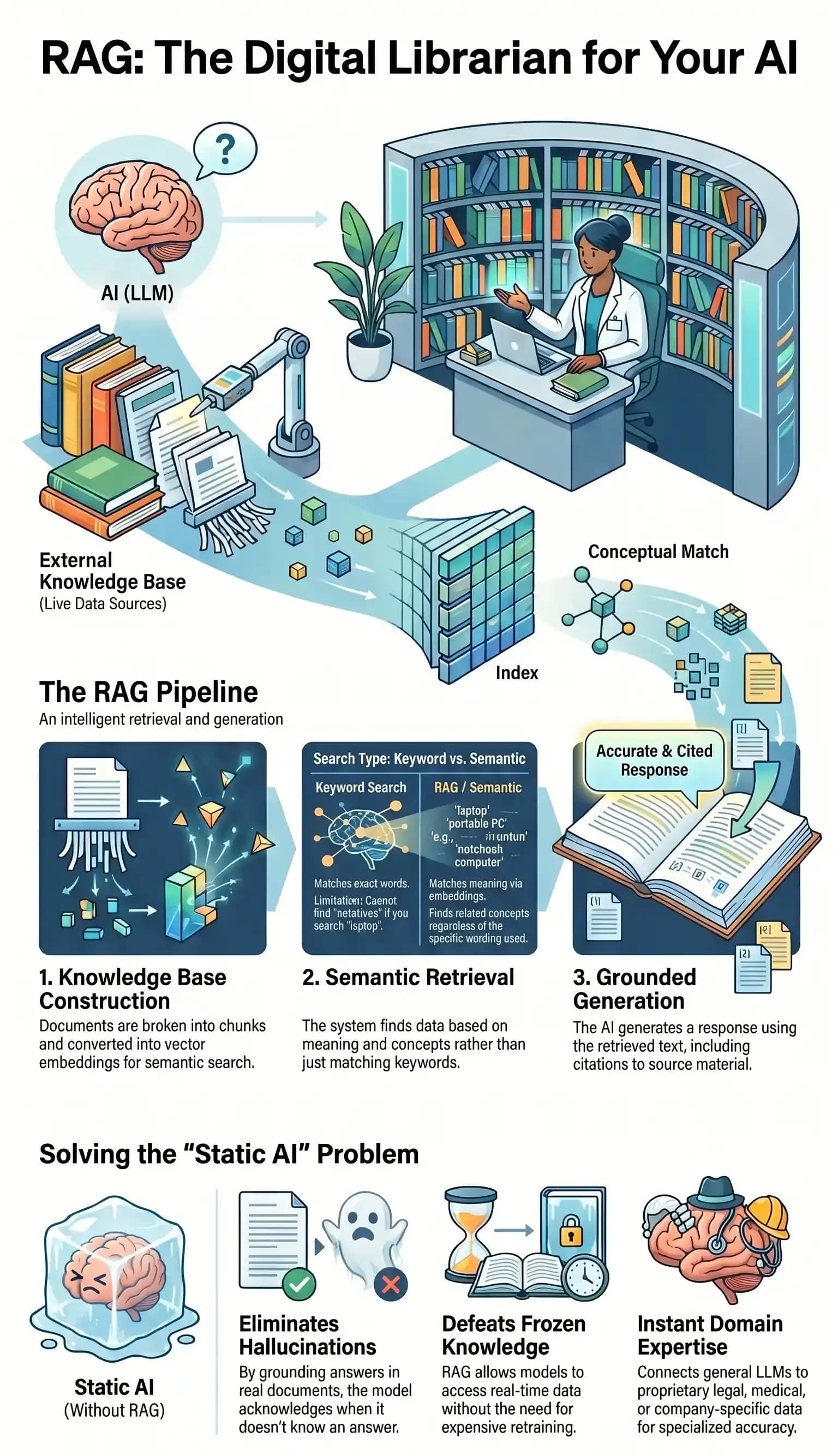
The pipeline is simple once you understand embeddings. Each of the five steps builds upon the previous one.
-
Build the knowledge base: Chunk documents, convert to embeddings, store in vector database
-
Process the query: Convert the user question to an embedding
-
Retrieve similar data: Find closest chunks via semantic search
-
Augment the prompt: Combine the retrieved context with the original question
-
Generate final answer: The LLM produces a grounded response with citations
Let's explore each step in detail.
Build the knowledge base
Your documents get chunked into smaller pieces and converted into long lists of numbers called embeddings. Each chunk becomes a single point in that 768-dimensional meaning-space, stored in a vector database ready for search.
The chunking strategy matters more than most implementations acknowledge, but that's a separate discussion.
Process the query
When someone asks a question, the system converts it into an embedding using the same method. Now you have the user's intent represented as coordinates in the same space as your documents.
Retrieve similar data
The system finds chunks whose embeddings are closest to the query embedding. This phase is where semantic search outperforms keyword matching. As an example, consider the following scenario.
If you asked, "What's our return policy?" it finds documents about "refund procedures" and "merchandise exchanges," even if those exact words never appeared in the query.
Augment the prompt
The retrieved chunks are combined with the original question to create an enhanced prompt. Instead of asking the model, "What's our return policy?" You're now asking, "Based on the following policy document [retrieved text], answer this question: What's our return policy?" The system does these tasks automatically behind the scenes.
Generate final answer
The language model produces an answer grounded in the retrieved data. Because it's working with actual source material, responses can include citations and are far less likely to hallucinate.
The model doesn't change. Your knowledge base does. New documents are embedded and added. Outdated ones are removed. The system stays current without retraining anything.
What RAG Actually Solves
Three problems make RAG worth implementing.
The hallucination problem
Language models generate plausible-sounding text that often has no grounding in reality known as hallucinations. They'll confidently deliver wrong answers because they lack factual data. RAG solves this problem by grounding the model in real sources.
When answers come from your documents with citations, users can verify accuracy. The model can acknowledge rather than fabricate an answer when the retrieved context does not support it.
The frozen knowledge problem
A model trained in early 2024 knows nothing about late 2025. But maybe your internal policies changed last quarter, or your product documentation was updated just yesterday. RAG sidesteps training data cutoffs entirely.
The knowledge base reflects current reality. Update a document, and the next query uses the new information.
The domain expertise problem
General models struggle with specialized knowledge. Examples of specialized knowledge include legal precedents, medical literature, engineering specifications, and your company's proprietary processes. RAG lets you connect a model to your actual domain data. The model becomes an expert in your specific context without expensive fine-tuning or custom training.
When these problems are fixed with RAG, AI will be able to answer specific questions about your business, your field, or any topic that matters to you, instead of just answering general questions.
Getting It Right
Remember that librarian?
The one who knew the library's structure, the relationships between topics, and how to navigate from your messy question to the right answer? RAG is excellent at automating that kind of work, acting like a digital librarian for your AI models.
Let’s ground this metaphor into actual RAG concepts.
| RAG Component | Librarian Equivalent |
|---|---|
| Chunking strategy | How you organize the shelves |
| Embedding model | How you understand what things mean |
| Retrieval logic | How you know where to look |
Most RAG implementations underperform because teams default to tutorial-grade settings: generic chunking strategies, default embedding models, no metadata filtering, and tool descriptions that communicate nothing useful to the agent.
The technology gets blamed for implementation shortcuts.
Done well, RAG gives your AI the same superpower that the librarian had: not memorizing everything, but knowing exactly where to find it. With Lorka AI you can test out different models and see which one gives you the best librarian for each job.


Try Lorka AI
Try Lorka AI to compare leading AI models and find the best option for building accurate, grounded RAG workflows.
Try LorkaRAG FAQs
No, and this trips up a lot of people. Fine-tuning changes the model's actual weights, which is expensive, slow, and means you have to do it again every time something changes. RAG doesn't touch the model at all.
You just update the knowledge base it pulls from. Add a new document, remove an outdated one, and the next query already picks that up. The model stays the same. Your library doesn't.