


How AI Changes the Way We Work
As more AI tools become available and become more efficient, you go from the one doing the task to the one overseeing it, with the system doing the heavy lifting for you.
It's now much easier to plan and carry out tasks with the help of large language models like Claude or Gemini, with less friction and faster decision-making, giving you more time to focus on meaningful work.
Creating efficient workflows
Traditional productivity uses static to-do lists; AI actively helps you break down tasks, prioritize, and draft content. Instead of a blank page or long list, AI prompts instantly turn rough ideas into clear, actionable steps.
Reducing context switching and mental load
Switching between apps, tabs, or tasks incurs a "context switching" cost. AI mitigates this by centralizing your workflow for summarizing or analyzing. This reduces the mental effort required to start tasks, allowing you to focus on getting work done.
ChatGPT Productivity Prompts for Morning Planning & Task Prioritization
You can start planning a productive day in the first 30 minutes. These ChatGPT productivity prompts help you move from scattered thoughts to a clear plan so you can start your day without any brain freeze.
The "brain-dump" organizer
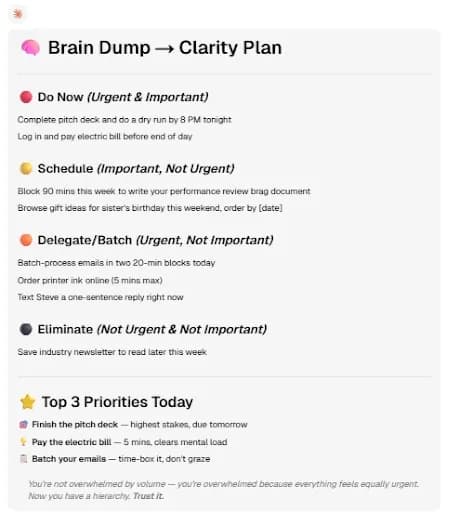
This prompt takes everything on your mind and organizes it using the Eisenhower Matrix (urgent vs. important), so you instantly know what to focus on and what to ignore.
Prompt 🚀
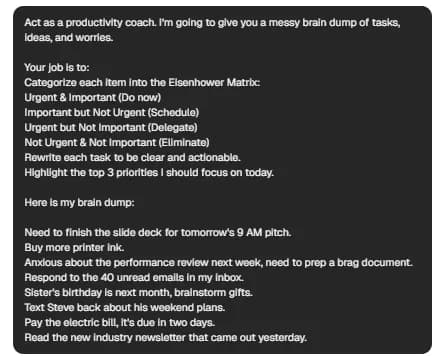
Act as a productivity coach. I’m going to give you a messy brain dump of tasks, ideas, and worries.
Your job is to:
- Categorize each item into the Eisenhower Matrix:
- Urgent & Important (Do now)
- Important but Not Urgent (Schedule)
- Urgent but Not Important (Delegate)
- Not Urgent & Not Important (Eliminate)
- Rewrite each task to be clear and actionable.
- Highlight the top 3 priorities I should focus on today.
Here is my brain dump:
[PASTE YOUR NOTES]
➡️TRY THIS PROMPT⬅️
Example in AI chat
Prompt:
Output:
The daily time-blocker
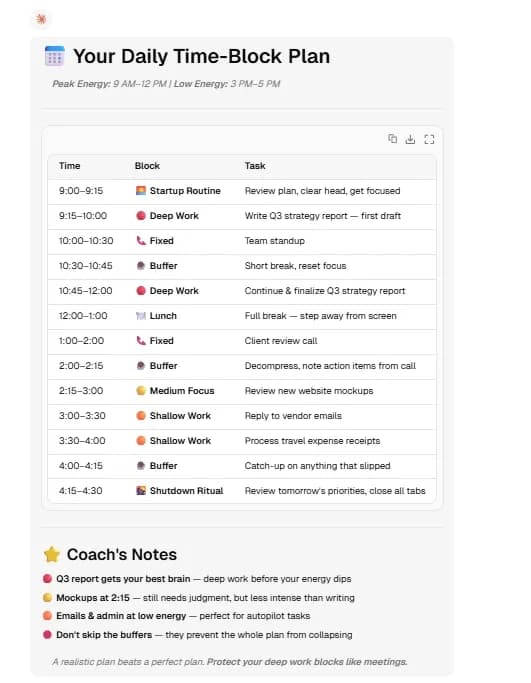
This AI prompt for productivity helps you build a realistic daily schedule based on your energy and workload to avoid overplanning and protect time for demanding work.
Prompt 🚀
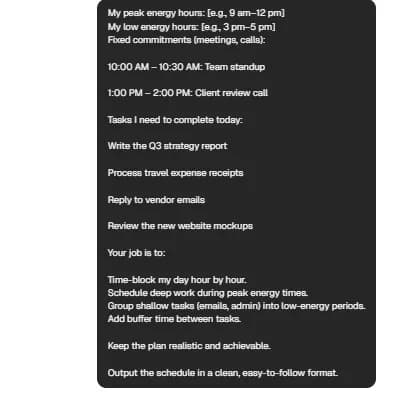
Act as a time management expert. Create a realistic daily schedule for me.
Consider the following:
My peak energy hours: [e.g., 9 am–12 pm]
My low energy hours: [e.g., 3 pm–5 pm]
Fixed commitments (meetings, calls): [LIST]
Tasks I need to complete today: [LIST]
Your job is to:
- Time-block my day hour by hour.
- Schedule deep work during peak energy times.
- Group shallow tasks (emails, admin) into low-energy periods.
- Add buffer time between tasks.
Keep the plan realistic and achievable.
Output the schedule in a clean, easy-to-follow format.
➡️TRY THIS PROMPT⬅️
Example in AI chat
Prompt:
Output:
The morning journal & intention setter
Before jumping into tasks, a quick mental reset can reduce stress and sharpen focus. The instructions below guide a structured 5-minute reflection to help you start the day with more clarity.
Prompt 🚀
Act as a mindfulness and productivity coach. Guide me through a 5-minute morning reflection.
Ask me the following questions one at a time and wait for my response before continuing:
- What’s currently on your mind? (brain dump)
- What are the 1–3 most important things you want to accomplish today?
- What might distract or stress you today?
- How will you handle those challenges?
- What is one intention or mindset you want to carry today?
At the end, summarize my answers into a short daily focus statement I can revisit.
➡️TRY THIS PROMPT⬅️
AI Prompts for Productivity for Deep Work & Execution
The following AI commands can help you stay focused and efficient when you get started to avoid looking at an empty page.
The "blank page" eliminator
Remove the blank page barrier by instantly generating a clear structure for any task so you’re never stuck staring at an empty document.
Prompt 🚀
Act as an expert in [TOPIC]. I need to create a [TYPE OF WORK: report, presentation, proposal, article].
My goal is: [DESCRIBE OBJECTIVE]
Target audience: [DESCRIBE]
Your job is to:
- Create a clear, logical outline for this project.
- Break it into sections with bullet points for what to include in each.
- Suggest a strong opening and key arguments or ideas.
- Keep it concise but actionable so I can start writing immediately.
Format the output as a structured outline.
➡️TRY THIS PROMPT⬅️
The meeting note synthesizer
Meetings generate a lot of noise but only a few key outcomes. This ChatGPT productivity prompt filters everything down to the important decisions, deadlines, and next steps.
Prompt 🚀
Act as an executive assistant. I will provide messy meeting notes or a transcript.
Your job is to extract and organize:
Key decisions made
Action items (with assigned person if mentioned)
Deadlines or timelines
Any unresolved questions or risks
Then:
Summarize everything in a clean, structured format
Keep it concise and easy to scan
Here are the notes:
[PASTE NOTES OR TRANSCRIPT]
➡️TRY THIS PROMPT⬅️
The email tone polisher
We’ve all written emails too quickly, but with the following instructions, you can use prompts for marketing, sales, and more to turn rough thoughts into professional messages in seconds.
Prompt 🚀
Act as a professional communication expert. Rewrite the following message to make it:
- Clear and concise
- Polite and professional
- Direct but not harsh
Keep the original intent, but improve tone and structure.
Optional: adjust the tone to be [friendly / formal / assertive].
Here is my draft:
[PASTE EMAIL]
➡️TRY THIS PROMPT⬅️
Prompts for Faster Learning & Summarization
AI can help you move through information faster without losing the meaning. Boost your productivity with AI prompts to better understand a new topic or test whether your own ideas are strong enough.
The Feynman technique explainer
If you want to understand complex topics in plain language, you can use the following prompt to ask Gemini or another AI model to simplify the idea and focus on what you actually need to remember.
Prompt 🚀
Act as an encouraging and patient teacher using the Feynman Technique to explain [INSERT TOPIC] as if I were a beginner with zero prior knowledge. Your goal is to make a complex idea incredibly simple by using everyday language, highly relatable analogies, and practical real-world examples. Strictly avoid jargon; if a technical term is absolutely necessary to learn, you must define it immediately using a simple metaphor. Please break your explanation into short, digestible sections with clear headings so I don't get overwhelmed. At the end of your explanation, ask me one simple, low-pressure question to test my grasp of the concept and wait for my answer. Once I demonstrate understanding, wrap up the lesson by providing the 3 most important takeaways I should remember.
➡️TRY THIS PROMPT⬅️
The long-form document summarizer
This is useful for reports, articles, transcripts, or pasted PDF content. It helps you extract the main point quickly without missing important context.
Prompt 🚀
Act as a research assistant. Summarize the following document: [PASTE TEXT OR CONTENT]. Identify the main thesis or central idea, the key arguments that support it, and any counterpoints, risks, or opposing views mentioned. Keep the summary factual and easy to scan. At the end, include a short TL;DR with 3–5 bullet points and a final note explaining what I should pay closest attention to.
➡️TRY THIS PROMPT⬅️
The “devil’s advocate” stress tester
Before presenting an idea, use an AI model to challenge it to help you find any weak logic or missing evidence that can hurt your argument.
Prompt 🚀
Act as a rigorous critical thinker, strategic advisor, and devil’s advocate. Carefully review the following idea, plan, or argument: [INSERT YOUR IDEA]. I want you to pressure-test this concept by actively searching for weak underlying assumptions, leaps in logic, vague claims, and hidden biases. Point out potential blind spots, realistic risks, edge cases, and the most compelling counter-arguments a harsh skeptic might raise. Keep your feedback direct, objective, and highly constructive. After thoroughly deconstructing the weaknesses, pivot to providing actionable solutions. Suggest specific ways to patch the logical holes, mitigate the identified risks, and strengthen the overall premise. Finally, conclude by offering a brief, reformulated version of the core idea that makes it bulletproof, convincing, and much harder to refute.
➡️TRY THIS PROMPT⬅️
Build Your Productivity Hub in Lorka AI
Productivity can easily break down when you’re constantly switching between tabs and workflows. Lorka AI brings everything together in one place, helping you stay focused as you choose the best model for each task.
With Lorka AI, you can:
-
Use GPT-5, Kimi K2.6, and other tools for logical planning and to carry out any type of task.
-
Use models like Sonnet 4.6 to read, summarize, and explain long documents naturally.
-
Organize ideas, analyze information, and draft content in one workspace.
-
Reduce context switching to move faster from planning to execution.
By using these prompts in Lorka’s all-in-one chat, you can create your ideal workflow and elevate your productivity.


Try These Productivity Prompts in Lorka AI
Paste your tasks, notes, or ideas into Lorka AI and turn them into clear plans, summaries, schedules, and next steps in one workspace.
Try LorkaFAQs
The best prompts are those of prioritization and planning. Use AI productivity prompts to divide tasks into the Eisenhower Matrix or break down important goals into actionable steps. The best way to be effective is to be specific by defining your tasks and goals clearly. This will give you structured and usable outputs.