


What Makes a Good AI Prompt for Emails?
A strong email prompt gives the model clear direction fast. The better your input, the better the generative AI will produce your email.
The 5 elements every ChatGPT email prompt needs
To make sure your email prompts are effective, you should add the following elements in as much detail as possible:
1. Subject and recipient context
Mention who the email is for and what your relationship is to them.
2. Tone
Select a tone that fits the situation and your brand or your company’s brand.
3. Purpose of the email
State the action you want, such as book a call, reply, approve, or pay.
4. Text limit
Set a clear word limit so the draft matches the reader's format and attention span.
5. Any specific information
List the details, facts, deadlines, or links the model must mention.
The 10 Best Ready-to-Use AI Email Prompts for Sales, Follow-Ups, and More
Use these ready-to-copy ChatGPT email prompts for sales, outreach, and more to generate high-performing messages fast. Replace the variables, paste the instructions into your AI tool, and send with little to no editing.
1. Cold outreach email prompt
Prompt 📧
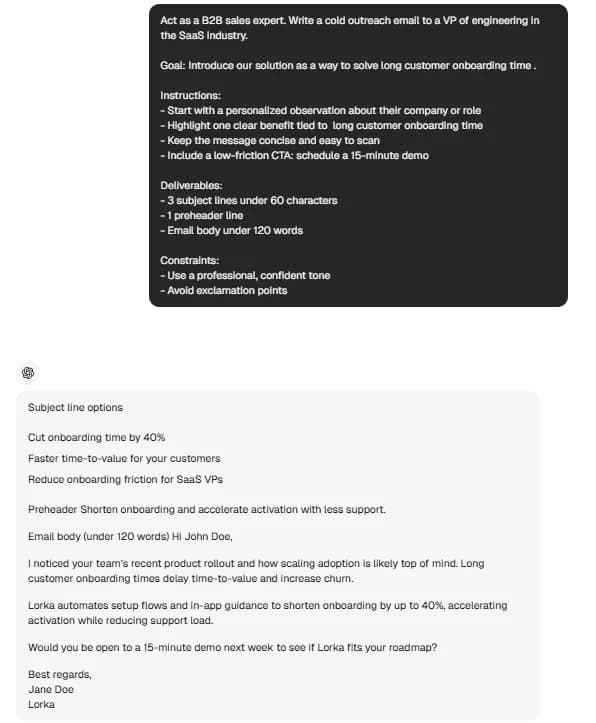
Act as a B2B sales expert. Write a cold outreach email to a [job title] in the [industry] industry.
Goal: Introduce our solution as a way to solve [pain point].
Instructions:
- Start with a personalized observation about their company or role
- Highlight one clear benefit tied to [pain point]
- Keep the message concise and easy to scan
- Include a low-friction CTA: [CTA]
Deliverables:
- 3 subject lines under 60 characters
- 1 preheader line
- Email body under 120 words
Constraints:
- Use a professional, confident tone
- Avoid exclamation points
-
Best for: sales, business development, freelance outreach
-
Customize it: change [industry], [pain point], [CTA]
Example from Lorka’s AI chat:


Try the Cold Outreach Prompt in Lorka AI
Generate personalized B2B cold emails with AI using proven outreach prompts, subject lines, and CTAs in seconds.
Try the Cold Outreach Prompt in Lorka AI2. Follow-up email prompt (after no reply)
Prompt 📧
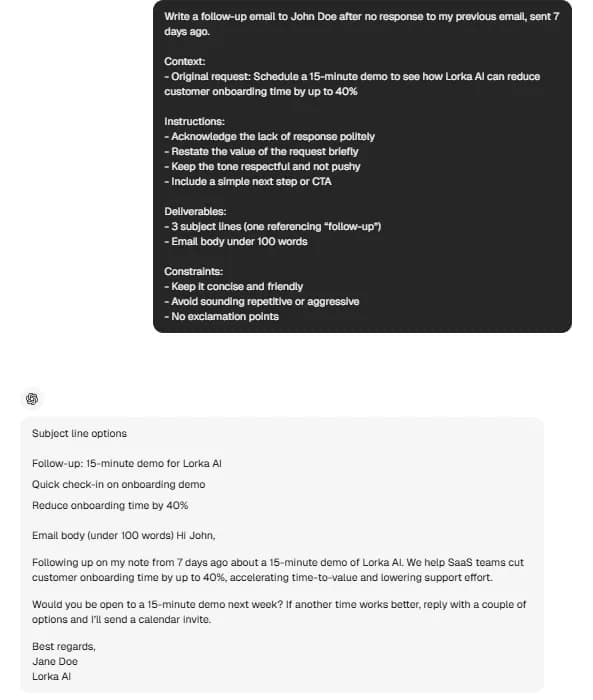
Write a follow-up email to [recipient name] after no response to my previous email sent [days since first email] ago.
Context:
- Original request: [original ask]
Instructions:
- Acknowledge the lack of response politely
- Restate the value of the request briefly
- Keep the tone respectful and not pushy
- Include a simple next step or CTA
Deliverables:
- 3 subject lines (one referencing “follow-up”)
- Email body under 100 words
Constraints:
- Keep it concise and friendly
- Avoid sounding repetitive or aggressive
- No exclamation points
-
Best for: sales follow-up, client follow-up, job applications
-
Customize it: change [days since first email], [original ask]
Example from Lorka’s AI chat:
Try the Follow-Up Email Prompt in Lorka AI
Write professional AI follow-up emails that increase replies with concise prompts, subject lines, and clear CTAs.
Try the Follow-Up Prompt in Lorka AI3. Sales email prompt (closing a deal)
Prompt 📧
Act as a sales closer. Write a persuasive email to a warm lead who is considering our offer.
Context:
- Product/service: [product benefit]
- Objection to address: [objection to address]
Instructions:
- Reinforce the main benefit clearly
- Address the objection directly with a solution
- Create urgency without pressure
- End with a clear CTA to move forward
Deliverables:
- 3 subject lines
- Email body with 2–3 short paragraphs
- 80 words maximum
- Include 3 bullet points highlighting value
Constraints:
- Use a confident, professional tone
- Focus on outcomes, not features
- No exclamation points
-
Best for: SDRs, account executives, B2B sales
-
Customize it: change [product benefit], [objection to address]
Try the Sales Closing Prompt in Lorka AI
Generate persuasive AI sales emails that handle objections, highlight value, and help move warm leads toward a decision.
Try the Sales Closing Prompt in Lorka AI4. Meeting request email prompt
Prompt 📧
Write a professional email requesting a meeting with [recipient name].
Context:
- Purpose of meeting: [agenda]
- Proposed time slots: [proposed time slots]
Instructions:
- Keep the email concise and clear
- Explain the value of the meeting briefly
- Offer flexibility if suggested times don’t work
- Include a clear call to confirm availability
Deliverables:
- 3 subject lines
- Email body under 80 words
Constraints:
- Use a polite, professional tone
- Keep it direct and easy to respond to
- No exclamation points
-
Best for: internal and external meeting scheduling
-
Customize it: change [agenda], [proposed time slots]
Try the Meeting Request Prompt in Lorka AI
Create professional AI meeting request emails with clear agendas, flexible scheduling, and concise CTAs.
Try the Meeting Request Prompt in Lorka AI5. Apology / delay email prompt
Prompt 📧
Act as a customer success manager. Write a professional email to a client explaining a delay.
Context:
- Reason for delay: [reason for delay]
- New deadline: [new deadline]
Instructions:
- Acknowledge the delay clearly
- Take responsibility without over-explaining
- Reassure the client with the updated timeline
- Offer a solution or make-good if relevant
Deliverables:
- 3 subject lines (include “update” or “timeline”)
- Email body under 120 words
Constraints:
- Use an empathetic, professional tone
- Stay clear and direct
- No exclamation points
-
Best for: client communication, project management
-
Customize it: change [reason for delay], [new deadline]
Try the Client Delay Email Prompt in Lorka AI
Generate professional AI delay update emails that explain setbacks clearly, maintain trust, and reassure clients with updated timelines.
Try the Client Delay Prompt in Lorka AI6. Job application email prompt
Prompt 📧
Write a job application email to apply for a [role] at [company name].
Context:
- Key skill or experience to highlight: [specific skill]
Instructions:
- Open with a clear statement of interest in the role
- Mention one or two relevant achievements
- Reference the attached CV
- End with a polite call to action for next steps
Deliverables:
- 3 subject lines
- Email body under 120 words
Constraints:
- Use a professional, concise tone
- Avoid generic language
- No exclamation points
-
Best for: job seekers attaching their resume to an email
-
Customize it: change [role], [company name], [specific skill]
Try the Job Application Email Prompt in Lorka AI
Create professional AI job application emails that highlight your experience, reference your CV, and improve your chances of getting a reply.
Try the Job Application Prompt in Lorka AI7. Client project update email prompt
Prompt 📧
Write a client update email about an ongoing project.
Context:
- Milestone reached: [milestone reached]
- Next steps: [next steps]
Instructions:
- Summarize progress clearly
- Highlight the completed milestone
- Outline upcoming actions and timelines
- Invite feedback or questions
Deliverables:
- 3 subject lines
- Email body with short paragraphs or bullet points, 100 words max.
Constraints:
- Use a clear, professional tone
- Keep it concise and structured
- No exclamation points
-
Best for: freelancers, consultants, project managers
-
Customize it: change [milestone reached], [next steps]
Try the Client Update Email Prompt in Lorka AI
Generate professional AI project update emails that summarize progress, highlight milestones, and keep clients aligned on next steps.
Try the Client Update Prompt in Lorka AI8. Polite rejection/decline email prompt
Prompt 📧
Write a professional email declining a request from [recipient name].
Context:
- Reason for declining: [reason]
- Alternative offer (optional): [alternative offer]
Instructions:
- Thank them for the opportunity or request
- Decline clearly and respectfully
- Keep the explanation brief
- Offer an alternative or keep the door open if relevant
Deliverables:
- 3 subject lines
- Email body under 100 words
Constraints:
- Maintain a respectful, professional tone
- Avoid sounding dismissive
- No exclamation points
-
Best for: declining requests, saying no professionally
-
Customize it: change [reason], [alternative offer]
Try the Polite Rejection Email Prompt in Lorka AI
Write professional AI rejection emails that decline requests respectfully, maintain relationships, and keep communication clear.
Try the Rejection Email Prompt in Lorka AI9. Invoice/payment request email prompt
Prompt 📧
Write a professional email to request payment for a completed project.
Context:
- Project name: [project name]
- Amount: [amount]
- Due date: [due date]
Instructions:
- Reference the completed work
- State the amount and due date clearly
- Include a polite payment reminder
- Keep the tone value-focused and professional
Deliverables:
- 3 subject lines
- Email body under 120 words
Constraints:
- Use a clear, professional tone
- Avoid sounding demanding
- No exclamation points
-
Best for: freelancers and consultants billing clients
-
Customize it: change [amount], [due date], [project name]
Try the Payment Request Email Prompt in Lorka AI
Generate professional AI payment request emails that remind clients politely, reference completed work, and improve payment follow-ups.
Try the Payment Request Prompt in Lorka AI10. Networking/reconnect email prompt
Prompt 📧
Write a professional networking email to reconnect with [recipient name].
Context:
- How you met: [how you met]
- Ask or offer: [ask or offer]
Instructions:
- Reference your previous interaction
- Show genuine interest in their work or role
- Include a clear but low-pressure ask or offer
- Keep the message short and conversational
Deliverables:
- 3 subject lines
- Email body under 100 words
Constraints:
- Use a friendly, professional tone
- Avoid sounding transactional
- No exclamation points
-
Best for: LinkedIn leads, conference follow-ups
-
Customize it: change [how you met], [ask or offer]
Try the Networking Email Prompt in Lorka AI
Write professional AI networking emails that reconnect naturally, build relationships, and make low-pressure asks with confidence.
Try the Networking Email Prompt in Lorka AIEmail Prompt Template (Steal This)
Try out this fill-in-the-blank template for email prompts that you can use for marketing, sales, and more:
[Recipient context] + [email purpose] + [tone] + [length] + [specific detail or CTA]
Example prompt with variables 📧
Write a professional email to [recipient context] about [email purpose]. Use a [tone] tone. Keep it to [length]. Include [specific detail or CTA].
Example prompt filled in 📋
Write a professional email to a marketing manager whom I met at a trade show about booking a demo. Use a friendly but professional tone. Keep it under 120 words. Include a CTA asking if they’re available next Tuesday or Wednesday.
Common Mistakes When Writing a Professional Email With AI
Creating an AI prompt for writing a professional email can be helpful, but it can also be frustrating if you leave out important details. Avoid these mistakes to get messages that are ready to send.
Being too vague with the recipient or context
If you don’t mention key details like who the email is for or why it matters, the output will likely be generic and leave out information that drives replies.
Not specifying tone
Without specifying the tone, your email outputs could come across as stiff. Remember to set clear expectations, like friendly or persuasive, to match the situation.
Skipping the call to action
If you don’t define the next step, the email lacks direction. Always include a clear action like reply, book, approve, or confirm.
Accepting the first output without retrying
Even with a good email prompt, you might not get the perfect result. Go back and update your instructions and be more specific if possible. Then, try it again for a better output.
Write and Send AI Emails Without Switching Tabs
If you’re writing prompts in one tab, then copying them into a ChatGPT model in another tab, tweaking it, and pasting the output into your email, you're taking one too many steps.
Lorka’s all-in-one platform can help you remove that friction.
Write your prompt, choose your model in Lorka’s chat, whether it’s GPT, Claude Sonnet, or something else, and generate your email in one place without having to switch tabs.
Run the same prompt across a different AI model like Gemini or Grok and pick the best version instantly, all for a flat $19.99/month plan.
Generate your Email on Lorka AI
Write prompts, compare AI models, and generate professional emails in one workspace without switching tabs.
Generate your Email on Lorka AIChatGPT for Email Writing FAQs
For the best email draft, your prompt should be as specific as possible. **Some of the key elements to mention** are who the message is for, what you want to communicate, the feeling or style of the message, how long the email should be, and any specific information or required next steps.