
Key Takeaways⭐
- Claude Code is Anthropic's AI agent, and it works inside your project rather than in a browser chat. It reads, edits, runs, and validates, with your permission at each step.
- It's one of several Claude products. Chat is where you talk to Claude, Cowork is where you hand Claude a job, and Claude Code is where you hand Claude your project. All three live in the same desktop app.
- The desktop app removed the terminal. Beginners and non-developers get the same chat-style experience, with a token meter, standing instructions, hooks, and helper agents underneath.
- It fails in predictable ways. Vague tasks, claimed-but-not-done work, and long-session drift. The fix is the same every time: review the change, because the agent cannot certify its own work.
- Pick it for judgment-heavy work. On narrow tasks, the competitors are close. On long, ambiguous, multi-agent work, Claude Code is my bet, and it is a bet on the harness as much as on the model.
On a client build earlier this year, I had three agents running at the same time, controlled through one chat interface on my desktop.
One mapped a popular codebase I was researching. I broke it down file by file and wrote up how the pieces fit together. One coded up an integration based on an implementation plan that I had mapped out earlier that morning with help from a separate agent. Another agent looked over my personal project and explored ways that we could learn from and upgrade it based on the research findings of the other agents’ efforts.
I sat in the middle and made the high-priority calls on what was worth building.
All of these activities happened in Claude Code. The status line in the corner showed me exactly how much context room was left, so I could spend tokens efficiently without blowing up my weekly budget limits. In total, several million tokens of work were done inside a single chat window in my Claude Code desktop app. The total task took less than an hour!
The same job would have taken me several days a year ago, and I would’ve crawled out the other side exhausted.
What Is Claude Code?
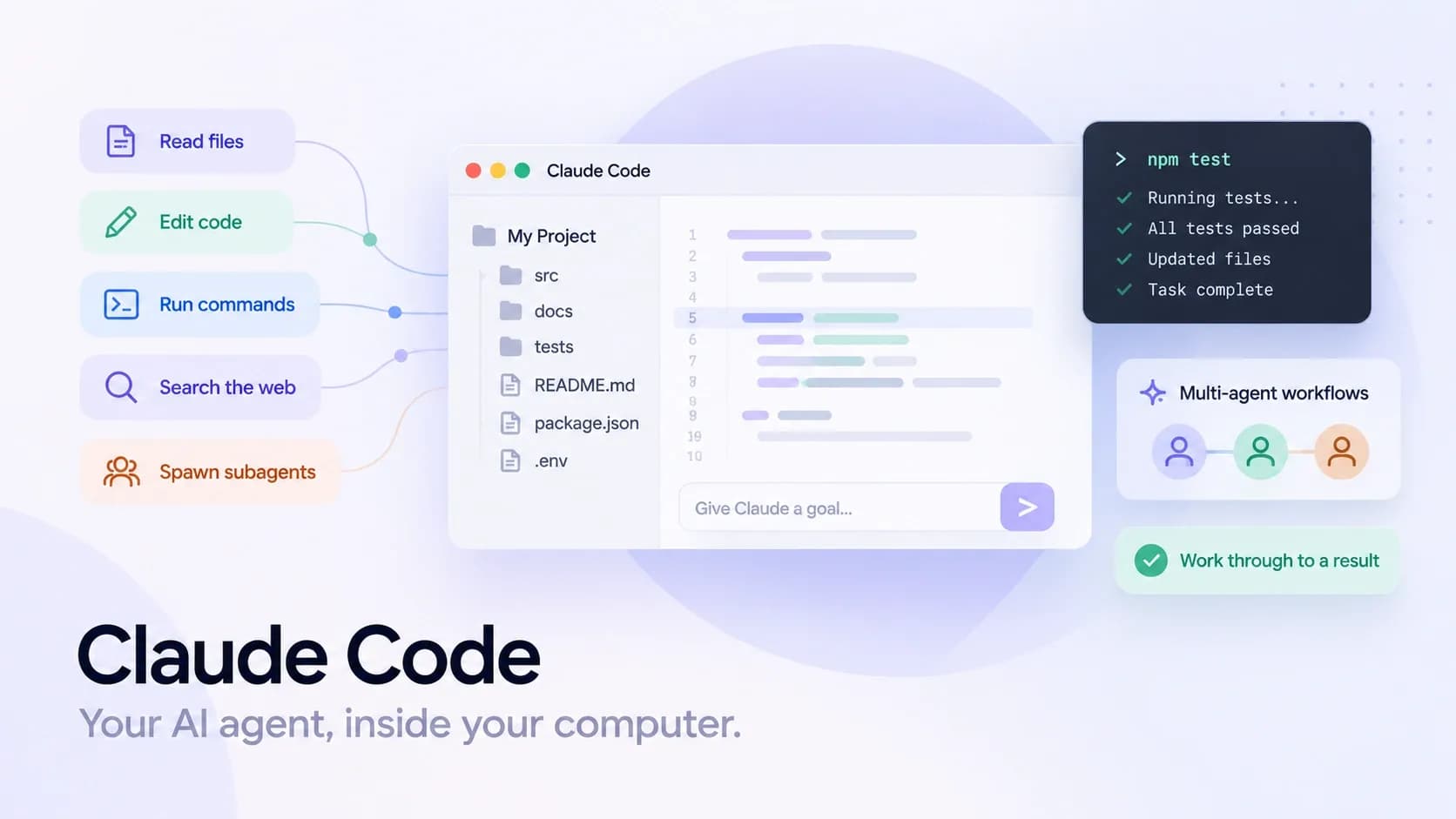
Claude Code is Anthropic’s AI coding agent: a tool that can read your codebase, edit files, run commands, and connect to your tools to finish multi-step work inside any project folder you’ve approved.
For people used to AI websites like ChatGPT, it can feel intimidating to give an AI direct access to your computer. Anthropic was the first to make that kind of computer access safe and reliable, and today they are one of the most profitable AI service providers in the market, with more than 4 million weekly active developer users.
The easiest way to picture the difference between Claude Code and a standard chat interface is like the difference between talking to a consultant over the phone, guiding you on how to do something, versus hiring a professional contractor to come into your home and simply get the job done for you.
A consultant might be brilliant, and you can describe your house to them all day. They can tell you what's probably wrong with the plumbing and how they might fix it. Then you hang up and do the work yourself. That's Claude in the browser.
Alternatively, imagine that a contractor walks in, opens the cabinet under the sink, finds the leak, fixes it, runs the tap to check, and tells you what they changed. You still inspect the work before they consider the job finished to ensure it meets your standards. That's Claude Code.
An AI agent like Claude Code comes with a dedicated toolbox that lets it take a wide range of actions, such as the following:
- read a file
- edit a file
- run a command
- search the web
- spawn subagents
It chooses when and how to use those tools, then works through a multi-step task by writing a to-do list, executing it, checking the result, and asking you for input when it hits a decision it cannot make alone.
Claude Code is Anthropic’s agent harness. It was originally built for software development and nowadays is increasingly used for anything that lives in files on your computer, such as creative writing, task automation, and even video editing.
Which Claude Are We Talking About?
Anthropic now ships enough products that the term “Claude” by itself is ambiguous, and most of the confusion around Claude Code comes from mixing the products up.
Here’s a quick breakdown of the core Claude products:
| Product | Mental model | What you give it | What it can do | When it’s the right pick | Where people get confused |
|---|---|---|---|---|---|
| Claude (Chat) | A consultant ready to answer any question for you | Prompts + whatever you paste/upload | Research, draft documents, explain, reasons | Writing, thinking, quick Q&A, lightweight analysis | People expect it to act on their system without being handed files/tools |
| Claude Cowork | The contractor who takes the job and comes back finished | A goal + connected docs/tools access | Runs multi-step work across your documents and integrations; returns a completed deliverable | “Just do it” outcomes: reports, summaries, populated docs/spreadsheets | People expect fine-grained control over every step like a dev harness |
| Claude Code | The engineer working inside your project | A goal + permission to read/edit/run in a folder | Reads code, edits files, runs commands, and spawns helpers; you review diffs | Software builds, debugging, automation, anything file-based where execution matters | People treat it like chat (too vague) or treat it like autopilot (skip review) |
I used to work in construction, so I’ll stick with the “getting work done on your house” metaphor to break down the different layers of what Claude means, as well as how it differs from Claude Code.
Claude in the chat window: whether that's the browser, the desktop app, or your phone, he is like an on-call consultant. You paste or attach what you want it to see, have a conversation with it, and it tells you what it thinks. This is a standard AI chatbot.
Claude Cowork: the contractor who takes the whole job off your hands and comes back with it finished: a report pulled from your files, a fully populated spreadsheet, a bunch of research compiled, or pretty much anything else you need. It works across your documents and connected tools, and it’s built for people who want the result without watching the work.
Cowork and Claude Code overlap the most, varying depending on how much control over the underlying tech you want.
Cowork doesn’t let you change its settings. Claude Code, on the other hand, gives you deep configuration control to review and adjust. Things like the system prompts, permissions, hooks, and helper agents are all yours to set.
If you want finished work and don’t want to deal with configuration, Cowork is probably for you. Alternatively, if you want to customize the process or run several agents at once, then Claude Code is the best service available from Anthropic.
Some smaller features, but no less valuable, include Claude Design, which takes a description and returns prototypes, slides, and one-pagers. Also, Claude in Chrome lets the AI operate directly in your webpage when a tool has no API or requires login (such as social media or business tools).
To get the same design functionality, you can use the Claude Code design skill. And for browser access, simply asking Claude Code to access your Chrome browser will be enough for it to activate Claude in Chrome directly.
Chat, Cowork, and Claude Code are all in one single Claude desktop app for Windows and Mac. Other developers are using tools like Lorka AI as an agent aggregator to get access to all the latest models, including the suite of Claude models from Anthropic. People use Lorka for side-by-side benchmarking and model switching without needing to manage multiple separate subscriptions.


Compare Claude and Other Leading AI Models
Access Claude, GPT, Gemini, and other leading AI models in one platform. Compare performance and switch models without managing multiple subscriptions.
Try Lorka AIHow Does Claude Code Work?
Claude Code is an agent harness. The underlying model (e.g., Fable, Opus, Sonnet, Haiku, etc.) is the engine; the harness is the vehicle wrapped around it. It includes the system prompt, the tools, the permissions, the memory, the integrations, and the to-do list that keeps it working until the job is done.
The first step to configuring your Claude Code would be updating its system prompt. This is in a file called Claude.md in your project that gets read at the start of every session. The Claude.md file is where you’ll want to include your coding standards, preferred libraries, review checklist, and the things you’re tired of repeating. Claude Code also keeps its own memory across sessions that allows it to learn over time.
The next core feature is Hooks, which act as explicit guardrails. They’re small terminal commands that run automatically before or after the agent takes an action. It’s an advanced feature, but the idea is simple: if you can express something as a shell command, you can turn it into a Claude hook.
For example, you can format a file after every edit or run a linter before every commit. Hooks matter because rules written in a prompt will eventually get forgotten as the chat grows, but a hook fires every single time its trigger is hit.
Claude Code can spawn extra copies of itself to work on different parts of a task in parallel or to absorb noisy output like a test run so only the summary comes back to you. The three agents on that client build were exactly that, and multi-agent workflows of that shape are where most of the upside now lives.
The power of Claude Code is that it can be programmatically connected to outside systems through MCP servers or plugins. Most community plugins and skills are saved as markdown files, so you can read them, edit them, and have Claude Code make the edits for you. It also troubleshoots directly on your machine, taking your personal config, your logs, and your installed software into consideration.
What Can You Use Claude Code For?
It’s a bit of a trick question, because the potential use cases are basically limitless. If the agent can read files, write files, run code, and talk to your tools, then the ceiling is effectively infinite. People use Claude Code for any workflow you can describe as inputs → transformations → checks → outputs.
Here are a couple of popular use cases to spark inspiration for the kinds of problems it can solve.
| Job | Where it shines | Where it bites |
|---|---|---|
| Research | Mapping an unfamiliar codebase, tracing flows, and finding the "Where does X live?" answers fast | Assuming things about undocumented architecture, it won’t look for context you didn’t point it at |
| Debugging | Clear errors, focused tests, proposed fixes | Fixes that silence the symptom and leave the cause |
| Building | Small, well-scoped features, prototypes, endpoints, refactors | Vague requirements, security gaps, code that doesn’t match the rest of the repo |
| Documentation | Turning messy code into readable docs: runbooks, onboarding, ADRs, API references | Garbage-in/garbage-out if the source material is stale or incomplete |
| Creative development | Iterating on visuals and media workflows such as animations and AI-generated content via a Higgsfield MCP | Toolchain drift, heavy outputs, and quality control that still needs human taste |
Common Problems With Claude Code
Claude Code has real limitations. Even though it gives you extraordinarily fine-grained control over the underlying model, it still runs into hard technological and systems constraints. Here are a few of the most common ones and how to deal with them.
Vague tasks can lead to assumptions that quickly compound
I once asked an agent to wire up a new cloud billing endpoint, assuming it would reuse my existing configuration. Instead, an overly enthusiastic sub-agent swapped every model reference to a deprecated version it “remembered,” then borrowed a billing account from an unrelated project.
Naturally, the change created new problems, so it hallucinated fixes that created more problems, which triggered more hallucinated fixes, and so on until I caught it, several hours deep in the swamp.
It sometimes gives up early or gives outright lies
I watched an agent report that it had grounded its answers in research after its search had actually returned nothing useful. The problem was it didn’t use the correct search tool. I explicitly told it to use the Perplexity MCP so that it would have a higher-quality, well-rounded response.
The kicker is that it did try Perplexity, but it didn’t wait long enough for the tool to finish loading into its toolbox. It decided that meant the tool “didn’t exist,” defaulted to its native web search because it was faster, and then reported the search results as if it had actually used Perplexity.
Admittedly, the agent was an older model from Q2 2026, but it’s a pattern worth watching. Agents will lie, and they will often take the easiest route to get the job done.
Long sessions degrade
As the context window fills, Claude Code compresses older history. In my case, it had just finished shipping a chunk of code that a separate agent had already reviewed and approved. Then, after compaction, it completely forgot that the whole episode had ever taken place.
So it bulldozed the approved implementation, rewrote its own version, grabbed the same report from the original work, and tried to stroll back in as if nothing changed. The fix is to separate “writers” from “reviewers,” and don’t run sessions so close to compaction that the agent starts hallucinating its timeline.
Multi-agent swarms can burn your entire budget
Once you start running multi-agent workflows, it gets weirdly addictive. The problem with this approach is that you can step away for a minute and return to a crater where your budget used to be. The experience gets especially tantalizing if you’re playing with ultracode mode, where they’ll happily spin up a small civilization of sub-agents and systematically destroy your credits in record time.
The solution to most of these problems is to set hard limits on the task assignments. I cap it at three agents. That provides enough parallelism to move fast, but not so many voices that coordination degrades into confusion. If the task is genuinely complex, I’ll go higher, but I treat 3–8 as the outer boundary, and I need a real reason to climb that ladder.
Anything past 8 subagents gets unwieldy fast unless you’re persisting progress in an external CRM or Kanban system.
The non-negotiable for managing swarms is that every agent must have an explicit scope. Each agent needs a name, a job, an expected output, and a stop condition. If you don’t do that, they orbit the same problem, duplicate work, invent work, argue with each other, and waste time performing productivity instead of producing anything of value.
How Does Claude Code Compare With Codex, xAI’s Grok, and Open Source?
This assessment is my professional opinion, not an academic study. I’ve been hand-coding RAG tools into agents since 2023, built custom MCP servers starting the week the protocol shipped at the end of 2024, and spent well over a thousand hours in agent harnesses across research, content, coding, support, and database automation. Here’s what I’ve seen.
Codex
Codex from OpenAI is the biggest direct competitor, and on a tight, well-scoped task, it’s excellent. Occasionally it finishes a single action faster and cleaner than Claude Code. Claude Code gives me up to a million tokens of working room, while Codex has a default context cap of about 272K.
My read is that OpenAI tunes its agents toward terse, focused reasoning to keep them out of thinking loops. That works on narrow jobs and gets unwieldy on wide ones.
Anthropic trains Claude against a written constitution that the model uses to critique and revise its answers. Rumor has it that OpenAI uses a “caveman” approach to thinking. It makes the system sharp on small tasks but blind to nuance on complex ones.
Grok Bot and Grok Build
Grok Bot and Grok Build from xAI are some of the newest players in the agent harness race. The latest is Grok Bot, which has been way better than expected since xAI sent it out in August 2026.
While both are agent frameworks originating from xAI, they are engineered for different audiences and workflows.
Grok Build competes with Claude Code and Codex. Grok Bot, however, is more similar to open harnesses like OpenClaw or Hermes that help teams manage swarm deployments across multiple devices, such as desktop and mobile.
This last season has been the first time I’ve seen so many engineers saying that xAI is going to directly compete with Claude Code. Early adopters appreciated the company’s quick response to community needs, consistent completion of agent tool calls, and staying on task.
xAI is still behind on controls that Claude Code has already improved, such as permissions and diff review. But if they keep improving at their current pace, I think xAI will catch up to and possibly surpass Claude Code by the end of 2026.
Open Source
Open-source models are quickly catching up, specifically GLM 5.3,DeepSeek V4-Pro, and the latest Qwen 3.8 Max. DeepSeek's harness has been popular lately for its plugin-native design, where file operations, permissions, and even the model itself are plugins you can swap or extend. This makes it highly customizable.
New models ship every month, and keeping a subscription for each would be unnecessarily expensive. That is where multi-model aggregators like Lorka AI fit into a development workflow: providing a single interface for benchmarking performance and switching between models side by side, without managing separate subscription plans.
Open-source harnesses like OpenCode, OpenClaw, and Hermes let you populate them with whatever model you like. I agree with the read across r/LocalLLaMA that open harnesses are catching up to Claude Code faster than open models are catching up to frontier models.
A gap still separates a fully open stack from Claude Code running Anthropic's best models, but every release shrinks it. I wouldn’t be surprised if we reach feature parity sometime in 2027.
A controversy around open-source harnesses is that Anthropic doesn’t let you use your Claude Code subscription credits through third-party harnesses, which pushes you toward pricey API usage. One exception is T3 Code, built by Theo Browne (the engineer behind the T3 Stack). He had a very public back-and-forth with Anthropic on Twitter and apparently won.
I’ve been using Claude Code through T3 for testing, and as of August 2026, it still seems to be the only popular open-source harness that actually lets you use your Claude Code subscription without eating those API fees. But don’t try this with other harnesses. There are plenty of horror stories of people getting a rude email from Anthropic or a massive API bill.
FAQs
No. Claude Code is included with paid Claude plans, and it is also available through an Anthropic Console account billed on API usage. The free Claude plan does not include it. Current plan details are on Anthropic’s pricing page.