

Key Takeaways⭐
- An MCP server connects your AI to your real world: It exposes specific files, tools, and actions to an assistant so it can do useful work instead of only talking.
- The server is not the model: The model is the brain; the server is a hand that reaches one specific tool or data source. One AI can use many servers at once.
- MCP is a standard, not a rival to APIs or RAG: It is the shared shape that lets any AI app and any tool work together, and it often delivers the data that grounding relies on.
- Safety relies on trust and permissions: MCP can run locally and limit access. The danger is not new; it is the ordinary caution of the internet made visible.
- The standard has won fast: Major AI companies support it, and the models themselves now speak it, so your data is no longer locked to a single vendor.
Picture the smartest new hire you have ever met. Brilliant, well-read, sharp instincts. On their first morning, they sit down at the desk, and they cannot log into their email. They have no badge for the supply room. They have never seen your shared drive. All that talent is locked outside every system that would allow them to help.
That is a large language model like ChatGPT or Claude on its own.
It knows an enormous amount about the world in general and almost nothing about your own world. It cannot open your Google Docs, read your company handbook, or check today's calendar. It can talk and often sounds intelligent, but it needs something else to connect to your systems.
An MCP server is what gives that brilliant new hire the keys.
I'll never forget the first time that I plugged my Claude subscription into Notion and then proceeded to have it generate multiple documents, help reconfigure multiple databases, and then refactor a bunch of documentation pages that I had long been dreading.
And it did all of these tasks in the background while I ate my lunch and scrolled on YouTube.
That’s when AI went from an interesting party trick to a genuinely disruptive resource, the same way that a new hire becomes useful only after their badge and software sign-in finally work.
To summarize, an MCP server is the thing that connects your favorite agent to your favorite software systems.
What Is an MCP Server?
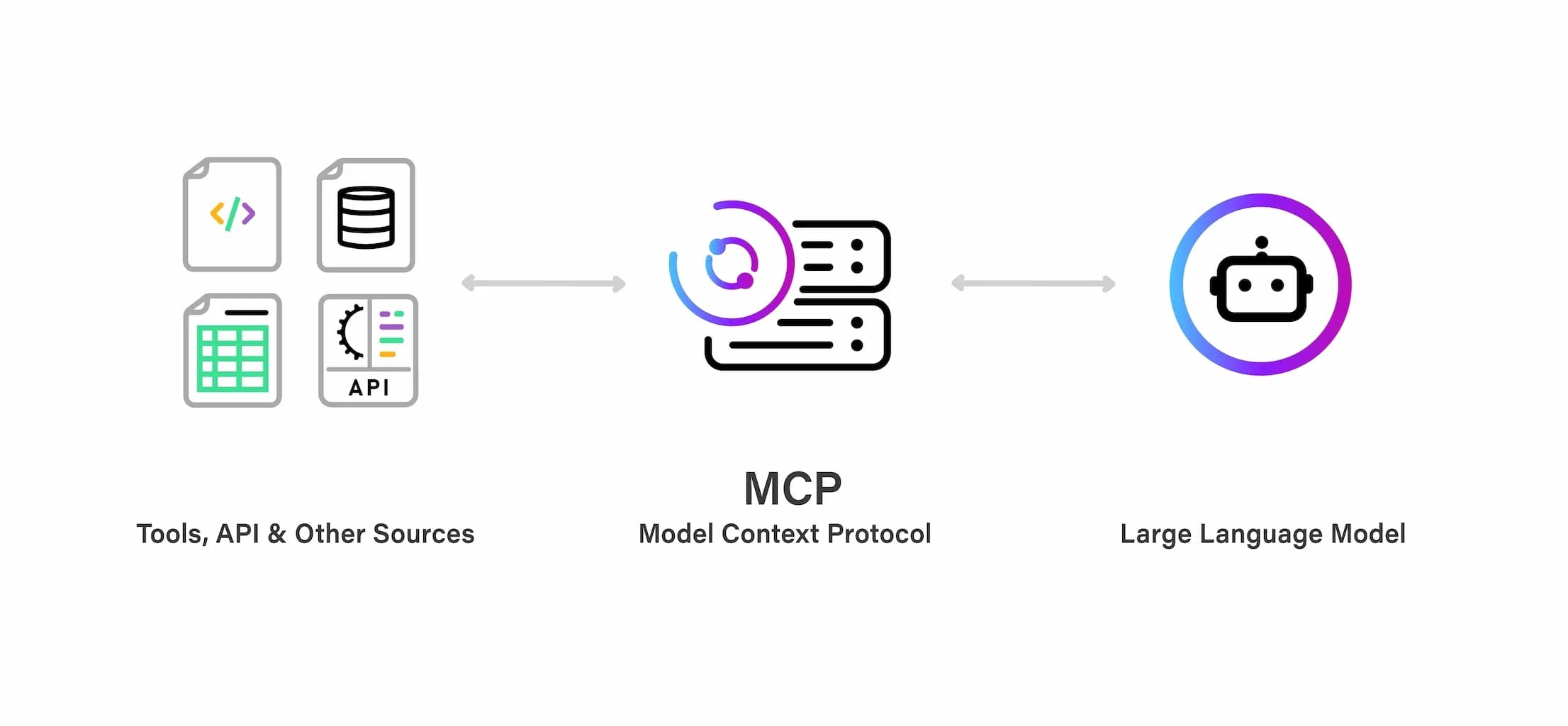
An MCP server is a small piece of software that gives an AI system access to specific data, tools, or actions through a standardized format called the Model Context Protocol.
When your assistant needs to read a file, search a database, or send a message, it does not do that itself. It asks an MCP server, the server does the work, and then it hands the result back.
Before we dive deeper, I need to clarify something that trips up almost everyone: an MCP server is not the AI model. The model is the brain. An MCP server is like a hand, a way for that brain to reach out and touch one specific thing in the real world.
A large language model can run many tasks at once. One MCP server for your documents, another for your email, and a third for your customer records.
Each is a separate, lightweight connection to a different corner of your digital life.
The word "server" makes it sound fancier than reality. An MCP server can be a simple, tiny program running in the background on your laptop or a service sitting on a company network. What makes it an MCP server is that it speaks the Model Context Protocol, the shared language we will look at next.
What Is MCP in AI?
The Model Context Protocol is a shared language for connecting AI systems to outside tools and data. Anthropic, the company behind Claude, introduced it in late 2024 and released it as an open standard, which means anyone can use it and build on it freely.
Here is the problem it solves. Before MCP, every time someone wanted their AI to work with a new app, a developer had to hand-build a connection for it. Connect to Google Drive? Build a connection. Add Slack?
Previously, each new software required you to build another custom connection from scratch in a different shape. Multiply that by every app a business uses and every AI tool it wants to try, and you get a tangle of one-off integrations that constantly break and are never carried over from one tool to the next.
MCP replaces that tangle with a single repeatable pattern. Build one MCP server for your data, and any AI app that speaks MCP can use it. People compare it to a USB-C port for AI, and the comparison holds: one standard plug instead of a drawer full of incompatible cables.
Once your data speaks MCP, it’s then happy to connect with any AI on the other end, whether it’s ChatGPT, Claude, or whatever you decide to switch to next year.
MCP is the plumbing. The model is the voice.
How an MCP Server Works
Three parts have to talk to each other for any operations to happen.
- The host is the app you actually use: Claude Desktop, an AI feature built into your writing or coding tool, or a chat window. It is where you type and where the answer appears.
- The client is a small piece built into that host. Think of it as a translator. It speaks MCP on your AI's behalf and knows how to talk to servers.
- The server is what we have been describing: the connection to one specific data source or one set of actions.
The request travels in one direction, and the answer comes back:
You → Host → Client → MCP Server → your data or tool → back to you
Let’s break that down into plain English: Let’s say that you ask your assistant a question. The host then hands it to the model. The model realizes it needs something from the outside world, so the client passes that request to the right MCP server.
The server fetches the file or runs the action and sends the result back up the chain. The model folds that real information into its answer. The whole round trip takes a split second, and the complexity never bothers you.
The elegance that makes MCP so popular is that every step has a clear boundary. AI agents never reach into your data directly. They ask, and the server decides what to hand back.
MCP vs APIs, RAG, and AI Agents: Clearing Up the Confusion
An API is how two pieces of software have always talked to each other. It is the older, more general idea, and MCP runs alongside APIs, in fact, a server often wraps an existing API in a standard shape.
It does not replace them. The difference is the shape. A traditional API is custom-built for one app in its own format. MCP is a standard shape that any AI app and any tool can agree on in advance.
| Feature | Traditional APIs | MCP Standard |
|---|---|---|
| Setup | Custom code for every app you connect | One universal pattern that works everywhere |
| Maintenance | High. Every app changes on its own schedule | Low. The protocol is standardized |
| Data privacy | Data often leaves your own systems | Can run locally or remotely |
| Interoperability | Each connection is its own silo | One server works across many AI apps |
| Scaling | Hard to reuse from one tool to the next | Easy to reuse across tools and workflows |
Function calling is the model's side of the same idea. Mid-answer, a model can pause and say the following: I need a tool for this. That request is function calling. MCP is the other side. It standardizes what the tool on the other end looks like, so the same tool plugs into any model that asks.
RAG (Retrieval-Augmented Generation) is a method for handing an AI the right outside information before it answers, so it responds from real sources instead of guessing. That is the heart of grounding, and MCP and RAG are partners. An MCP server is often the pipe that goes and fetches the documents a grounded answer relies on.
An AI agent is a model that can take actions across several steps. MCP is how an agent reaches the tools and data it needs to get anything done across those steps. When you read about a capable AI agent accessible through an MCP, this is usually the plumbing underneath it.
What an MCP Server Actually Does
MCP servers have a lot of cool technology inside. I'm going to briefly introduce you to the most important components that make it work. There are three main buckets.
- Resources are things the AI can read. A file, a document, a row in a database, and a support ticket. This command is "look at this."
- Tools are things the AI can do. Search for something, send a message, update a record, or run a calculation. This is "do this."
- Prompts are ready-made instructions the server offers for common jobs, so a complex task gets handled the same reliable way every time. This is "Here is the proven way to do that."
Here’s how that might look in practice.
Perhaps a documents server might let the AI read your files (resources), search across them (tool), and summarize a contract using a template your team trusts (prompt). Tools are easiest to conceptualize. Resources and prompts are systems and raw materials that make your chatbot fit how you work.
The quality of the setup across resources, tools, and prompts is what determines the quality of your MCP solution.
Real Things You Can Connect to an MCP Server
Now that we’ve covered the core ideas behind MCP servers, here are a few of the most common ways people use them. And to be clear: almost any software can either act as an MCP server or connect to one.
- Your documents and notes: Google Docs, Notion, Obsidian, or a folder of PDFs on your laptop. The AI can finally read and reason over the things you actually wrote.
- Your business systems: a database, a CRM like Salesforce, and the spreadsheets your team lives in. Ask a question in plain English and get an answer pulled from real records.
- Your communication: Slack and email, so an assistant can find the thread you half remember or draft the follow-up you keep putting off.
- Your computer: a developer can point their editor at their project so the AI sees the actual code, not a vague approximation of it.
- Multi-step work: an agent can string several of these together, pulling context from your documents, checking a record, and drafting a reply, all in one go.
The pattern across all of them is the same. The information already existed. It was just locked in a format the AI could not reach. An MCP server is the key that fits every lock.
Is an MCP Server Safe?
It's worth starting this section with the clear callout that all software systems have security challenges and vulnerabilities. MCP servers don’t create a brand-new danger so much as it makes existing internet risks harder to ignore.
Here’s a quick reminder of how things work under the hood of your digital device.
The moment you connect any tool to the web, you trust it with something. That was true of every app, every browser extension, and every "sign in with Google" button long before AI arrived. MCP makes that trust visible and asks you to be deliberate about it.
A few plain rules keep you safe 🛡️
- Do not plug into a random server you found somewhere: Same instinct as not installing sketchy software or clicking on sketchy links from strangers. Stick to servers from sources you would trust with the data they touch.
- Know what you are handing over: A server connected to your email can read your email. That is the point, and it is also the risk. Give each server access to what it needs and nothing more.
- Local stays local: Because an MCP server can run on your machine, your sensitive files can stay there instead of being shipped off to someone else's cloud. For many people, that is the most reassuring part of the whole design.
MCP gives developers the control to build those boundaries well, but whether a given tool actually does so depends on how it was built. Well-built MCP setups use permission boundaries, so a server can only do the specific things it was granted.
The mindset is the same operational caution that has always applied online or with mobile apps. Be smart about what you allow on your device.
The Future of MCP
When Anthropic released MCP as an open standard, it invited the whole industry in.
Today, almost all the major AI players, including the tools behind ChatGPT and the assistants from Google and Microsoft, work with MCP in some form, while each also retains a bit of its own in-house plumbing.
Once your data and tools use a standard format, you are no longer tied to a single AI company. You can send the same question to several models and keep whichever does the job best.
That is the idea behind Lorka AI: one subscription, access to the top models like GPT-5.5, Claude, and Gemini, and the freedom to switch between them as your needs change. When data access is standardized, the only question left is which model uses your context best, and the cheapest way to find out is to try them side by side.


Connect Your AI Tools with Lorka AI
Use GPT, Claude, Gemini, and more in one platform to connect your AI workflows with MCP-powered tools and data.
Try LorkaFAQs
An MCP server is software that gives an AI system access to specific data, tools, or actions through the Model Context Protocol. It works as a secure bridge between the AI model and your files, apps, or databases, so the assistant can act on real information rather than its approximation.