

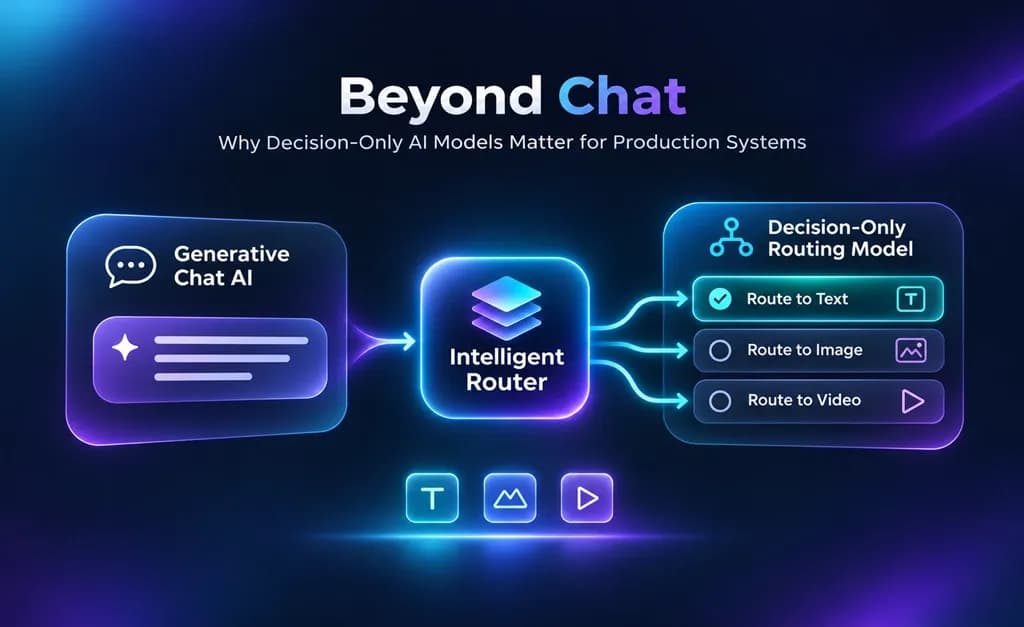
Key Takeaways ⭐
- The Jev decision model is TypeSafe's first public System One model. It’s designed to make quick decisions for software automation.
- Decision-only AI models pick from answers you define. Generative AI models create outputs for people (e.g., text, images, video, etc.).
- A type-safe answer is not the same as a correct one. Misclassification and prompt injection remain real risks without proper contract configuration.
- Jev works best as an amplifier for your other systems. It turns messy text into values your code and your team can act on.
- Always give it a way out. Add an option like “unsure” or “needs a person” so it never forces a bad fit.
- Use the right model for the job. Decision models sort and route. Generative models write and create.
I once had a client that sells survey equipment and uses a document retrieval pipeline for their customer service and lead generation. The system searches brochures, spec sheets, repair manuals, and training recordings. Each file type was supposed to be handled differently, so the system first had to identify which category a document belonged to.
Well, that step was never built properly, so each document was left without a category. This failure caused an LLM to read every page manually instead, burning a fresh model call every time, whether the page was from a sales brochure or a repair manual. The platform was paying full price for the model to do a worse job, at a higher cost, with a slower response time.
Notice how this job is simply a decision. The pipeline only needs a quick decision done repeatedly at scale: a report that includes what category this file is and where it belongs.
These are the types of problems that a decision model like Jev AI solves. It reads some text, answers the questions you defined in advance, and can provide a structured response along with a confidence score.
That doesn't mean Jev replaces your chatbot. Something I see is people wondering which model is better, but the reality is that they're entirely different tools meant for entirely different types of jobs.
Chat models create text responses. Decision models create decision or category selection responses.
What Is a Decision-Only AI Model?
If you've ever played a role-playing game, then you've seen a dialogue wheel. It’s the thing when your fantasy character speaks, and you pick one of multiple lines the writers prepared. You can’t go off-script, but you can still choose from any of the available options. A decision-only model works in a similar manner to that decision wheel.
To see why that matters, let’s compare it with common chatbots.
A generative AI model, like the LLMs behind modern chatbots, writes conversational text in response to your messages. A decision-only model is like having an agent that only responds in a structured format like a report or a form.
It gets some text, which their creator calls the state, plus a few questions, and picks each answer from options you wrote ahead of time. Currently there are three production answer types listed in Jev's documentation:
- Choice: one option from a list, such as "image," "video," or "stay in chat."
- Score: a rating on a scale you set, like how urgent a support ticket is.
- Noul: the probability that the answer to a yes-or-no question is yes.
Your preset options form an output contract. It guarantees that your code knows every possible answer category it could receive. This contract ensures that there’s no text paragraph to parse. This “type” contract is why you'll also see Jev called a “typed” decision model.
You'll run into one more name for it, too. TypeSafe calls models like Jev "System One models," after Daniel Kahneman's rapid System One thinking. The two kinds of model differ in what they produce, who reads the result, how the answer is shaped, and what job they’re designed to do:
| Generative model | Decision-only model | |
|---|---|---|
| Output | Text, code, images, or video | A pick from options you set |
| Who reads it | A person | Software |
| Answer shape | Open-ended unless constrained | Fixed by the options you set |
| Main job | Create the final output | Decide the next step |
Jev writes no text, so calls come back fast, and because every answer lives on your configuration list, your code gets values it can route and log. That makes it a particularly strong fit for business and software automation, since Jev handles small tasks at scale for an affordable price.
Chat aggregator Lorka AI is one example. It can run Jev behind its chat to point each request to the right place: the image tool, the video tool, or a text reply in chat. This helps users get the most value from their AI credits.
That fixed list also changes how Jev gets things wrong. Because Jev can only answer with options you defined, TypeSafe puts Jev's rate of hallucinations at 0%. That does not mean Jev always answers correctly.
TypeSafe's launch post says, "Our [0%] number is not empirical." The zero comes from a schema guarantee. This is a refreshing update given the history of companies trying to create these types of models.
Back when OpenAI launched function calling in 2023, I could get a model to follow a schema most of the time, but nothing guaranteed it. A year later, OpenAI reported that in its test of following complex schemas, its 2023 GPT-4 model scored under 40%, while a newer model using Structured Outputs scored 100%. Even so, OpenAI says structured outputs don't "prevent all kinds of model mistakes."
Jev only ever returns one of your options, so there's no format for it to get wrong. Whether it picks the right one still depends on the task.
The downside is that Jev physically can't answer outside your options. Sticking with the dialogue wheel metaphor, just because four lines are on the screen doesn't mean you'll pick the correct one.
Why Production AI Systems Need Decision Layers
Some websites are using LLM agents for all chatbot response types. Such behavior can cause unnecessary network hops, tool usage, and token burn.
Vercel has already switched one of its classifiers to Jev. According to TechCrunch, replacing the OpenAI model behind its command-safety classifier with Jev gave results five to 18 times faster, with better accuracy.
I hit the same problem on a smaller scale. Recently I overhauled a website that had a traditional chatbot that would answer every type of user request. This approach is like hiring a bank teller to do the job of an ATM.
Every visitor message waits on two extra calls to a full generative model: one sorts it into one of six intents, and the other reviews the drafted reply and returns either pass, revise, or human review. And occasionally it has to do tool calls for retrieval, which adds additional steps.
Situations like these are perfect for decision models because their answers have an explicit shape. And because Jev can provide a confidence score for its decisions, it means that you can even set up your routing with acceptability ranges.
Here are some types of questions you might ask that would be perfect for models like Jev:
- Intent routing: which option, tool, or person should handle this request?
- Tool selection: which tool should an AI agent call next?
- Output evaluation: is this draft ready enough to ship?
- Safety and escalation: should this action run, wait, or go to a person?
- Agent control: should the agent keep going or stop?
Software has already asked questions like these for years before Jev. What has practitioners so excited about decision models versus traditional solutions is that they can be easier to set up, cheaper, and faster than many current alternatives.
Vals AI measured the cost and speed in October with a single claim-checking test on Jev 1.13 and eleven language models. Below is a breakdown of Jev and some of its top competitors.
| Model | Input price per million tokens | Output price per million tokens | Cost per 1,000 checks | Time for one check |
|---|---|---|---|---|
| Jev 1.13 | $0.042 | Free | $0.02 | 0.12 seconds |
| GPT-6 Luna | $0.10 | $0.50 | $0.10 | 2.42 seconds |
| DeepSeek V4.1 Flash (open-weight) | $0.15 to $0.30 | $0.60 to $1.20 | $0.55 | 1.28 seconds |
| Claude Haiku 5.5 | $0.10 | $0.50 | ~$0.10–$0.12 (est.) | TDB |
| GPT-6.1 Sol | $2.00 | $10.00 | $3.52 | 5.12 seconds |
In that independent test, Jev cost about a fifth of the next-cheapest model and answered roughly six times faster than the quickest.
One caveat: the timing came from a single example question, and on a second Vals test of legal reasoning, Jev finished last on accuracy. Although I have seen good results with Jev, you should test these metrics against your specific use case before drawing conclusions.
Jev Recently Introduced Inside Lorka Chat
Lorka runs Jev inside its text chat as a routing layer. Jev works in the background while your chosen chat model writes its reply.
Type, "Create a product launch video from this idea," and Jev recognizes a video job. Under the reply, Lorka offers a "Create the video" button that opens its video workflow with your prompt already filled in. There, a dedicated video model creates a clip for you. In all of these interactions, Jev decides which tool each request should go to.
You type a video request into Lorka's text chat.

The chat model writes a plan, and Lorka offers "Create the video" under the reply.
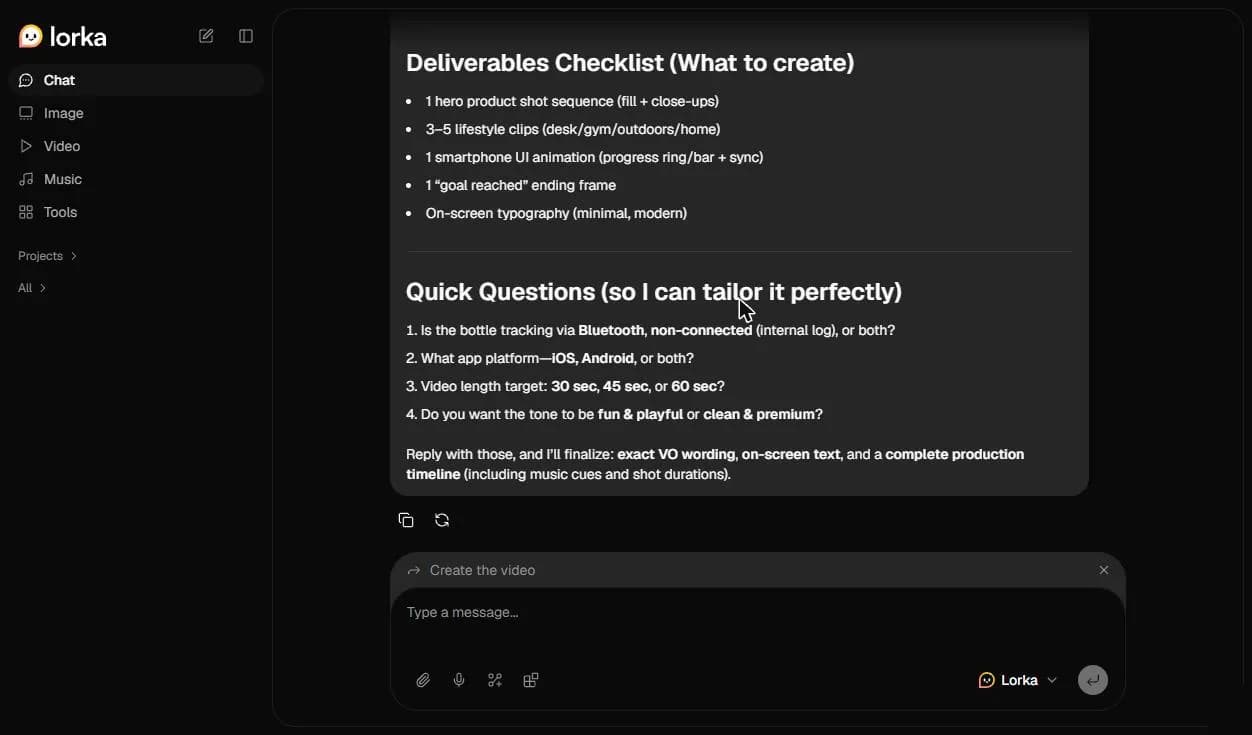
One click opens Lorka's video tool with your prompt filled in and its current default video model selected.

Asked for a product photo, the chat model says it can't make images. Lorka still offers "Create the image."
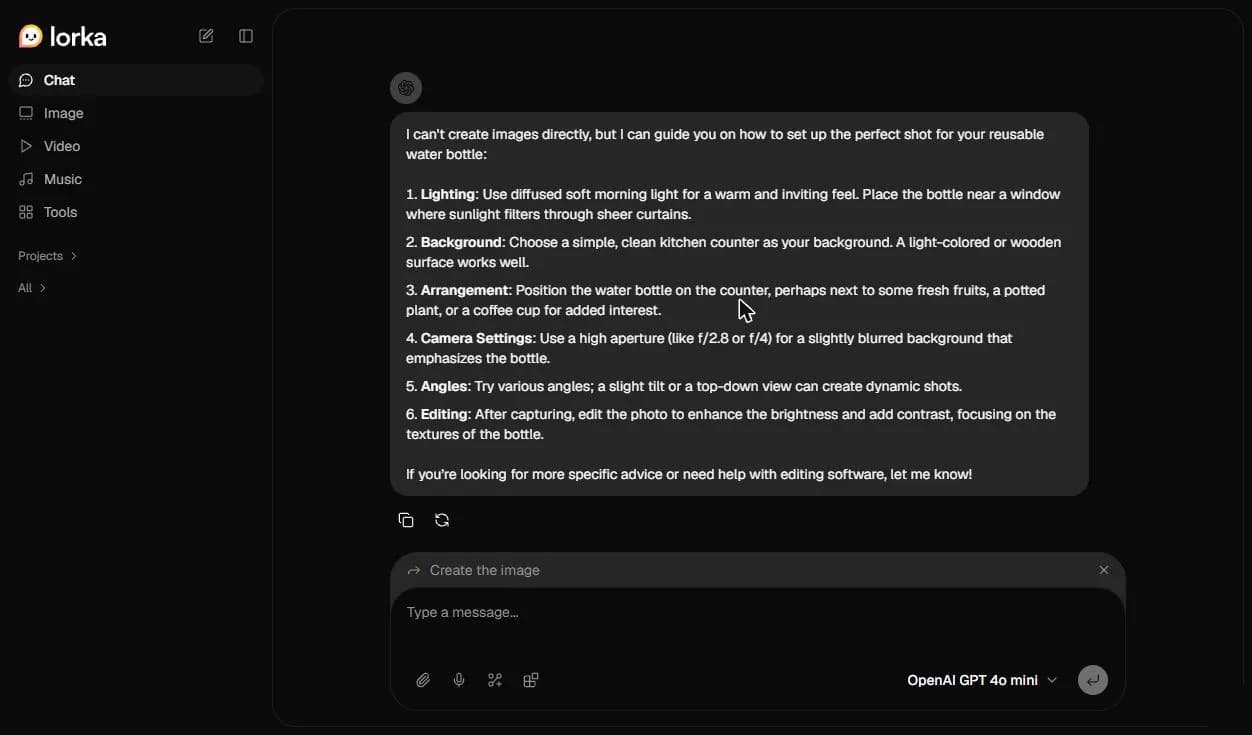
Lorka's image tool opens with the same prompt and its current default image model selected.

A report summary stays in chat, with no tool offered.
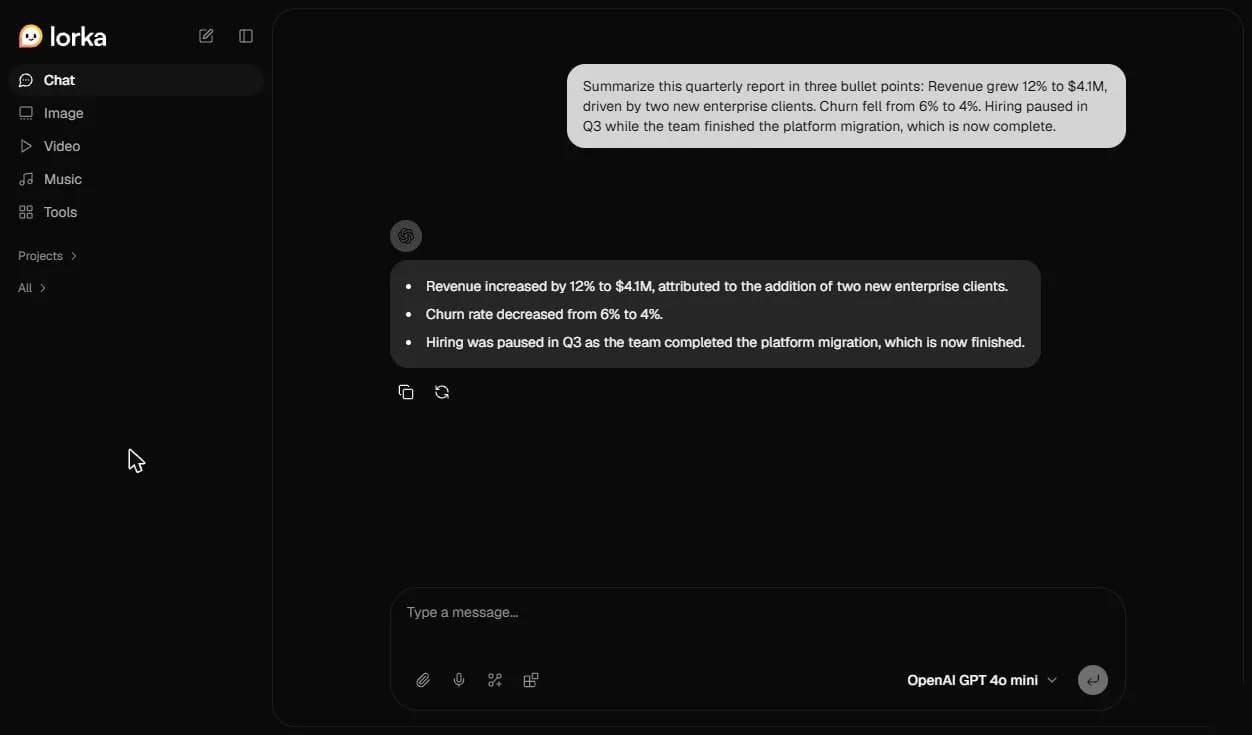
This keeps you focused while you complete tasks. No more bouncing between models for different output types. Ask for a product photo, and Lorka offers "Create the image," which opens its image generator with the same prompt. Request a summary of a quarterly report, and you stay in chat, where a chatbot model writes the response.
Jev takes your input and points you to Lorka's image or video tool, where a dedicated generation model makes the final output, so each model focuses on what it does best.
Aggregators like Lorka AI put the latest chat, image, and video models under one subscription, so you can switch between them without paying for each separately.


Turn Your Next Idea Into Action with Lorka
Have a creative project in mind? Start with a simple prompt in Lorka AI Chat and discover a smoother path from your initial idea to a finished result.
Try Lorka NowWhat Challenges Occur With Decision Models?
Think of a decision model as a small tool inside a bigger system. While a chatbot or an AI agent can write a reply to almost anything you ask, a decision model can only respond with the options you set up in advance.
Classic chatbots and generative AI models are still the only reasonable choice for content generation. If you want to write an article, create an image or video, or make something new, a decision model certainly isn't the right fit.
It can still make mistakes. Jev can pick the wrong option or misinterpret your source material. For example, if it’s given options in which none is correct, it can't respond to say "none of these." So instead, it picks whichever option it thinks is least wrong if nothing is clearly correct.
TypeSafe's own list of weaknesses covers the main challenges with the model:
-
Misclassification: a valid answer can still be the wrong one.
-
Hidden uncertainty: if no option fits, it still picks one.
-
Prompt injection: the text it reads can steer its verdict.
-
Poor calibration: its confidence can be off for the task.
-
Overreliance on confidence: a high score can't tell you an action is safe.
-
Sensitivity to detail: option order, numbers, and stray text can change answers.
Most of these risks depend on how you set it up. To get the best results from a decision model, define your options clearly and provide enough context for each input to make a confident decision.
Jev is only as effective as the options you give it, so write them carefully. Always include an escape hatch, like "unsure" or "needs a person," or it will simply pick the least wrong option.
Conclusion
Most AI products work better when each model does the job it's built for. Decision models are designed to select from the provided options and generate classifications with confidence scores at an affordable price. Generative models write text and make images and videos.
I saw this firsthand. My survey equipment client didn't need a large model reading every page. What we needed was a quick way to sort each document by file type so that each one received the right handling.
A decision model like Jev could have routed those documents faster and for less than a full LLM would have taken to read every page. I'm now building Jev into the systems I work on, for jobs like classification, entity tagging, data enrichment, and confidence scoring.
FAQs
Jev AI is TypeSafe's first public System One model launched in early access on September 15, 2026. It reads text and answers questions you define by picking from options you set in advance. The software uses those answers to route requests or check results before acting.