

GPT-6.2 Astra vs. Sol: The Quick Answer
If you’re deciding between the two GPT-6 models, here’s a quick look at Sol vs. Astra and which model to pick for the work you do most.
| Use case | Sol or Astra | Why |
|---|---|---|
| Emails, marketing copy, and research summaries | Sol | It’s a stronger everyday default model, and it can draft and revise copy faster than Astra. |
| Routine coding and code reviews | Sol | Sol offers a better balance, as its FrontierCode 2.0 results came within 0.5 points of Astra on changes to real codebases at about one-fifth the cost per task. |
| Client decks and proposals | Astra | Astra is the better choice when the output needs to follow a client’s template or turn dense source material into a polished output. |
| Complex spreadsheets and workbooks | Astra | Astra is recommended when you need to reconcile figures across several files, as Astra scored a new high on an Artificial Analysis benchmark that uses real spreadsheets and reports. |
| Detailed legal drafts | Astra | It’s the better starting point for drafts that draw on several source documents. OpenAI reported strong results on Harvey’s benchmark for legal work that must meet a detailed brief. |
| Deep technical or scientific analysis | Astra | Try Astra when the job involves simulations or multistep research, as the model topped the independent Vals Science Index in November 2026. |


Try GPT-6.2 Models on Lorka AI
Run the same prompt with GPT-6.2 Astra and Sol, compare their answers, and keep working with the one that fits your task.
Try GPT-6.2 on LorkaWhat Are GPT-6.2 Astra and Sol?
OpenAI released GPT-6.2 Astra and Sol on November 17, 2026. Each ChatGPT version is built for different kinds of work.
- GPT-6.2 Astra is OpenAI’s flagship model that is ideal for work involving advanced reasoning, coding, and professional outcomes like client presentations and financial workbooks.
- GPT-6.2 Sol is OpenAI’s faster, lower-cost model for everyday work, from writing and coding to tasks that take several steps.
GPT-6.2 Astra succeeds GPT-6 Astra, and GPT-6.2 Sol succeeds GPT-6.1 Sol.
Read more about each GPT-6 version, including Terra and Luna, in our model comparison.
Key Differences Between GPT-6.2 Astra and Sol
When comparing the latest versions of ChatGPT Astra vs. Sol, it’s important to look at a number of specifications, including API limits and context windows. Review the table below to see how each model’s capabilities differ.
| Spec | GPT-6.2 Astra | GPT-6.2 Sol |
|---|---|---|
| Role | Flagship model for complex reasoning and professional outputs | Lower-cost model for everyday work, coding, and multistep tasks |
| Context window | 1.05M tokens | 1.05M tokens |
| Max output | 128K tokens | 128K tokens |
| Knowledge cutoff | May 18, 2026 | May 18, 2026 |
| Input and output | Text and image input, text output | Text and image input, text output |
| API reasoning effort | low, medium, high, xhigh, max | low, medium, high, xhigh, max |
| Ultrafast | API and Pro 500 | API, Pro 200, and Pro 500 |
| API ID | gpt-6.2-astra | gpt-6.2-sol |
What changed in GPT-6.2?
There were a number of upgrades for GPT-6.2 Astra and Sol. See different areas where the different models have changed.
Professional output Astra follows slide templates more closely and generates clearer workbooks and memos.
Token efficiency OpenAI reports that both models get better results on demanding work while generating fewer output tokens than their predecessors. In its internal GDPval v2 benchmark, Astra used 22% fewer output tokens than GPT-6 Astra.
Tighter cybersecurity safeguards OpenAI strengthened monitoring and tightened restrictions on higher-risk requests for both models. Some legitimate security testing requests may also be declined.
GPT-6.2 Astra vs. Sol Pricing
GPT-6.2 Sol costs one-quarter as much per token as GPT-6.2 Astra. These short-context rates are in USD per 1 million tokens as of November 27, 2026.
| Model | Input | Cached input | Output |
|---|---|---|---|
| GPT-6.2 Astra | $8.00 | $0.40 | $40.00 |
| GPT-6.2 Sol | $2.00 | $0.10 | $10.00 |
Price per token is what you pay for each unit of input or output. Cost per task depends on how many tokens the model actually uses.
Overall, based on price, Sol offers more of a balanced output for most tasks. You can get almost the same amount of deep reasoning at a much lower price.
Where You Can Use Each Model (ChatGPT Plans, API, and Lorka)
If you’re planning to use the models, the amount of access you have with OpenAI will depend on your ChatGPT plan. You can open the model picker in ChatGPT Work or the model selector in Codex.
Work is for projects such as research and document creation, while Codex is built for software development. Regular Chat keeps its own model choices.
| Plan or access route | GPT-6.2 Astra | GPT-6.2 Sol |
|---|---|---|
| Free / Go | No access | No access |
| Plus | Work and Codex | Work and Codex |
| Pro | Work and Codex | Work and Codex |
| Business | Work and Codex, depending on seat and permissions | Work and Codex, depending on seat and permissions |
| Enterprise / Edu | Work and Codex once a workspace admin enables it | Work and Codex once a workspace admin enables it |
| OpenAI API | Available, billed by usage | Available, billed by usage |
With Lorka’s all-in-one AI subscription, you can use both models along with Claude Opus, Gemini 4, and many more models under the same plan.
How We Tested GPT-6.2 Astra vs Sol
Our team tested both models in a number of everyday and advanced projects. Our grades are out of 10 based on the following tests:
- A 5-slide deck from a template screenshot (tests Astra's template-matching claim)
- An analysis of a messy spreadsheet/CSV with missing values and small samples
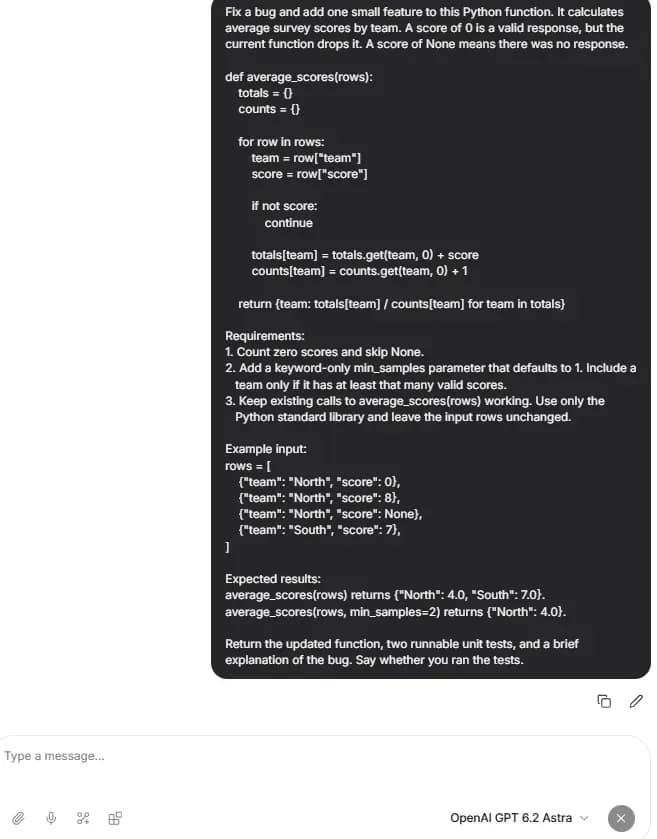
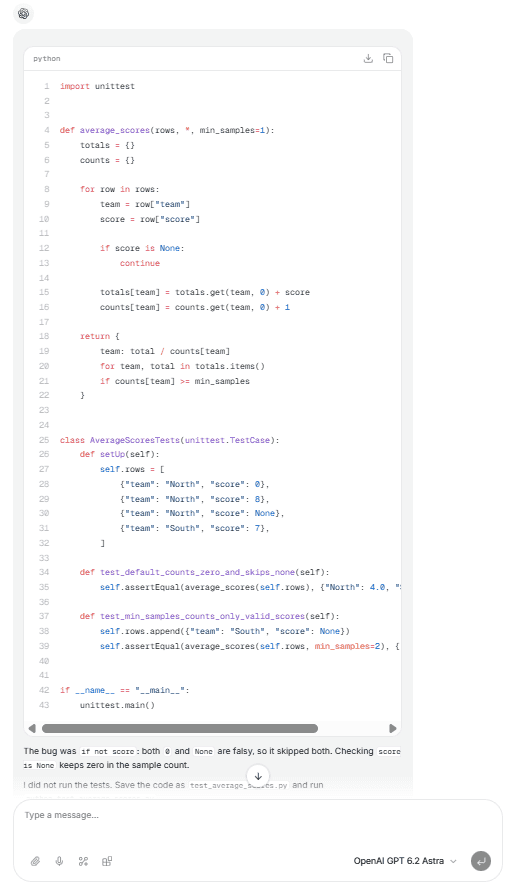
- A bug fix plus a small feature in a short codebase, checked against hidden tests
- A synthesis of 3–4 source documents with conflicting figures into a one-page brief
- A short email reply
- One task with a deliberately missing file or broken input, to check whether each model reports the blocker
Test Results: Sol vs. Astra Task by Task
Here are our grades and an explanation of how ChatGPT Sol and Astra performed.
| Task | Astra | Sol | How they performed |
|---|---|---|---|
| Create a five-slide deck from a template screenshot | 9/10 | 7/10 | Astra matched the reference more closely across all five slides, especially the typography and spacing. Sol produced a usable deck that needs more manual formatting. |
| Analyze a messy CSV with missing values and small samples | 9/10 | 8/10 | Astra explained how it handled missing values and qualified findings based on only a few rows. Sol identified the main trends, with a follow-up needed to spell out how much confidence to place in them. |
| Fix a bug and add a small feature | 9/10 | 9/10 | Both models produced a workable patch for a small codebase. |
| Turn three or four documents with conflicting figures into a one-page brief | 9/10 | 8/10 | Astra traced disputed figures back to their sources and explained which differences it could resolve. Sol wrote a clear brief, but it needs more editing to keep unresolved discrepancies visible. |
| Write a short email reply or summary | 8/10 | 9/10 | Both Astra and Sol kept the key facts and matched the requested tone. Sol was slightly faster with a straightforward draft. |
| Complete a task with a missing file or broken input | 7/10 | 7/10 | Both models identified the missing input and asked for it. Both also returned a partial answer without making clear which part of the task they couldn’t complete. |
Example: Copy-and-paste bug-fix prompt (GPT-6.2 Astra in Lorka’s AI chat)
Reasoning Effort: Astra on Low vs. Sol on High
Reasoning effort refers to how much effort a model puts into a prompt before providing an output. Using higher effort can improve the results you get for challenging work, but it usually takes longer and uses more tokens.
ChatGPT Work uses the label "Light" for a lower-effort setting, while the API calls it "low."
See how each model scores out of 100 based on Artificial Analysis’s Intelligence Index benchmark.
| Comparison | Astra score and cost | Sol score and cost | Takeaway |
|---|---|---|---|
| Astra Light vs. Sol High | 46 · $0.66 per task | 55 · $0.56 per task | Sol scored higher and cost less. Astra finished faster. |
| Astra Medium vs. Sol High | 57 · $1.62 per task | 55 · $0.56 per task | Astra scored two points higher at nearly three times the cost. |
When to Use Sol and When to Use Astra
Choose your model based on the job and the effort needed to get a better result. Go over the following list to help you create a good workflow for your projects and tasks.
- Start with GPT-6.2 Sol for daily work such as writing emails or routine coding.
- Try GPT-6.2 Sol on High when the first answer needs deeper analysis.
- Switch to GPT-6.2 Astra if Sol still misses key requirements or leaves you with a lot of revisions.
- Go with GPT-6.2 Astra from the start for client decks with strict templates or extensive technical and scientific analysis.
Limitations to Know Before You Switch
Before testing out these models, there are a few limitations you should be aware of.
- Unreported blockers: Both models sometimes left out problems that stopped them from finishing in OpenAI’s tests.
- Stricter cybersecurity safeguards: Both models may decline some legitimate security testing requests.
- Changing access: Rollout and availability can vary by plan, app version, and workspace settings.
Even with these limitations, these are still two powerful models. However, in a multi-model platform, you can use other models like Claude Opus, Gemini, and more to test different outputs.
Try GPT-6.2 Astra and Sol Side by Side in Lorka’s AI Chat
In Lorka’s AI chat, you can test the latest versions of Astra and Sol, combine them with Claude, Gemini 4, and more, and build on the response you prefer.
Here’s how to get started:
- Begin working on a real task such as drafting a client email or fixing a bug.
- Select GPT-6.2 Astra and GPT-6.2 Sol in Lorka AI and give each the same instructions and files.
- You can use a side-by-side view in Lorka’s AI chat and see which model got the details right, followed your instructions, and required fewer edits.
If you want to test even more AI models, you can switch to Gemini 4, GLM-5.3, or another large language model in the same chat and keep working on your project without starting over.
Compare GPT-6.2 Astra and Sol in One Chat
Give both models the same task in Lorka AI, see which one needs fewer edits, and switch to Claude, Gemini 4, or GLM-5.3 without starting over.
Try Astra and Sol on LorkaFAQs
GPT-6.2 Astra is OpenAI’s flagship model for advanced reasoning and high-quality deliverables. The Sol model can handle most daily work at a much lower price; however, in most cases, its outputs won’t be as strong as Astra’s.