


Key Takeaways⭐
- Claude excels in writing quality, producing more natural, professional content.
- Claude provides more precise reasoning and complex analysis with greater accuracy.
- GPT models are generally faster and better for real-time interaction.
- ChatGPT is the better all-in-one tool, featuring multimodality and speed.
- Anthropic models are generally superior for clean code drafts and repo-level thinking.
- Both models are available on Lorka AI under a single plan.
TL;DR: Claude vs. ChatGPT at a Glance
Is Claude better than ChatGPT? The short answer is sometimes yes, sometimes no. It depends on your needs and criteria.
To give you a better idea, here's a quick head-to-head comparison to help you understand the areas where each AI model wins:
| Category | Winner | Reason |
|---|---|---|
| Speed ⚡ | ChatGPT (GPT-5.4) | Faster responses, smoother UX, and better real-time interactions (especially with browsing, voice, and tools). |
| Accuracy and reasoning 🎯 | Claude Opus 4.7 | More precise reasoning, fewer hallucinations, and stronger “intellectual honesty” when analyzing complex inputs. |
| Writing ✍️ | Claude (Sonnet 4.6 / Opus 4.6) | More natural and less "AI-sounding". It avoids fluff and over-formatting, which is better for professional content. |
| Coding 💻 | Claude (Sonnet 4.6) | Offers a stronger agentic coding, better project-level reasoning, and higher production-ready output. |
| Multimodality 🎨 | ChatGPT (GPT-5.4) | ChatGPT is an "All-in-One" toolkit with Advanced Voice Mode for live camera/screen analysis, plus DALL-E and Sora 2 for visual generation. Claude is currently limited to text and image input. |
| Context window 🪟 | Claude Opus 4.7 | Both models offer massive context limits for long-running workflows. GPT-5.4’s standard window supports 272K tokens, while Claude 4.7 (Opus) supports 1M tokens. |
| API pricing 📊 | ChatGPT (GPT-5.4) | More cost-effective model for developers. GPT-5.4 costs $2.50 per 1M input / $15.00 per 1M output tokens, beating Sonnet 4.6 ($3/$15) and Opus 4.6 and 4.7 ($5/$25). |
| Price (Pro) 💰 | ChatGPT | More affordable at scale, especially via API; Claude AI is more expensive for heavy use. |
Deep Dive: How Claude AI and ChatGPT Compare in Reasoning, Coding, and Writing
See which AI alternative is better when it comes to writing, coding, and more, or how you can use both.
ChatGPT vs. Claude for reasoning & knowledge tasks
If your main goal is careful thinking, Claude often comes out ahead. It tends to be more analytical and more willing to question weak assumptions instead of simply agreeing.
- Claude is better for: Complex analysis and decision-making.
- ChatGPT is better for: Brainstorming and faster back-and-forth chats
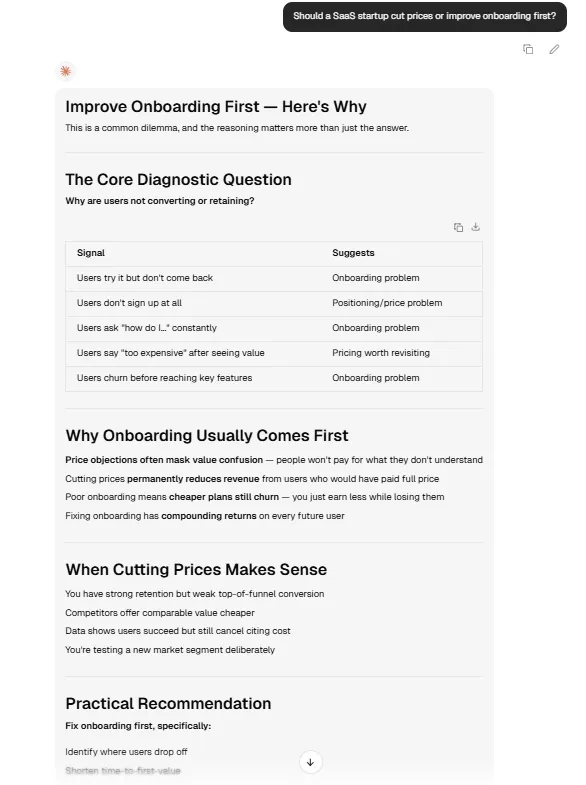
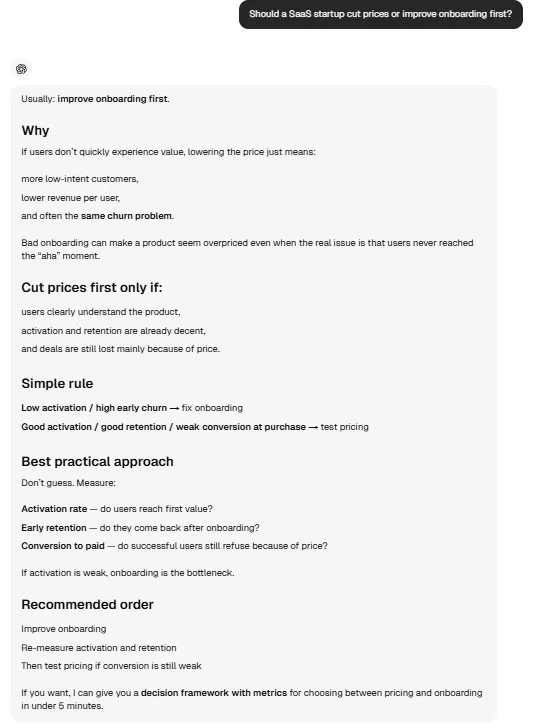
- Example: If you ask both models, “Should a SaaS startup cut prices or improve onboarding first?” Claude is more likely to weigh tradeoffs and challenge the framing, while ChatGPT may give a faster but more agreeable response.
🧠 Claude on Lorka
🧠 ChatGPT on Lorka
Our takeℹ️
For serious reasoning, Claude AI is a better choice. However, for everyday knowledge questions, ChatGPT is often easier and quicker.
Coding and tech task head-to-head review
For technical work, models like Sonnet and Opus are typically stronger. Take a look at where each model has an advantage if you are a developer.
- Claude is better for: Clean code drafts and repo-level thinking
- ChatGPT is better for: Tool-assisted workflows, debugging support, and mixed technical tasks
- Example: If you ask both models to build a multi-file Python app with authentication and error handling, Claude may produce a cleaner first version, while ChatGPT may be more helpful if you also want explanations, iterations, and connected tools.
Our takeℹ️
For pure code quality, Claude Sonnet 4.6 has the edge, even though GPT models still compete well.
Writing skills comparison between Claude and ChatGPT
We consider Claude the overall better choice for writing, as it’s one of its strongest categories, especially the Sonnet model. Its output often feels more natural, less formulaic, and better suited for long-form or professional content.
- Claude is better for: Articles, reports, essays, and more human-sounding drafts
- ChatGPT is better for: Fast drafting and collaborative editing
- Example: If you ask both to write a blog intro on AI tools for business, Claude will usually sound more polished and less generic. GPT models may offer a cleaner structure but a more predictable tone.
Our takeℹ️
If writing quality is your main priority, Claude wins. If speed and flexibility matter more, you can use Sonnet, but ChatGPT is also very practical.
ChatGPT vs. Claude for summarization and long text handling
In general, Claude is usually the stronger choice for long documents and dense material. It does a good job of maintaining context across large files and connecting ideas from different sections.
- Claude is better for: Summarizing contracts, long reports, research papers, and dense PDFs
- ChatGPT is better for: Drafting summaries, mixed-source research, and live web-based summarization
- Example: If you upload a 120-page policy document and ask about the biggest risks, Claude models are more likely to stay consistent throughout. ChatGPT might be easier for getting quick summaries of many recent web pages.
Our takeℹ️
For long-text understanding, it would be better to try Claude first. For faster summary tasks tied to browsing, ChatGPT can be a better fit.
General-purpose tasks comparisons
For everyday use, GPT models are typically the better option. They offer a larger ecosystem that works well for users who want a single tool for many tasks.
- ChatGPT is better for: All-around convenience, browsing, images, voice, and general productivity
- Claude is better for: Deeper thinking, stronger writing, and more careful analysis
- Example: For help planning a trip, generating an image, comparing products, and drafting emails in one session, ChatGPT is the better fit. If you want to review a business proposal or improve a long memo, Claude may do a better job.
Our takeℹ️
For most casual or mixed-use users, ChatGPT is the better all-purpose tool. For users focused on output quality, Claude is often the better specialist.
Claude vs. ChatGPT Use Cases for Business, Education, and More
Below, we go over the best ways you can use each model to carry out your work, whether you work in business, development, or education or if you just want to be creative.
Claude vs. ChatGPT for business
If you want to run your business more efficiently or make better decisions, both tools can help, but in different ways.
ChatGPT use cases 💬
If you want to move faster and automate workflows, a project manager can generate timelines, summarize meetings, or build reports instantly. A sales team can draft outreach emails or CRM updates in seconds.
Claude use cases ✴️
If you need to analyze complex business information, a strategy consultant can review a long business plan and identify risks. A legal or compliance manager can break down contracts or policies in greater depth and with greater accuracy.
Education and learning
To learn faster or understand complex topics more clearly, both models can support different learning styles.
ChatGPT use cases 💬
If you prefer quick, simple explanations, a student can ask questions like “Explain inflation in simple terms” or generate quizzes. A teacher can create lesson plans or exercises quickly.
Claude use cases ✴️
If you need deeper understanding, a graduate student can upload long readings and get structured insights. A research student can ask Claude to critique essays or improve arguments.
Research and knowledge work
This category is less about which model is “smarter” and more about how you work with information.
ChatGPT use cases 💬
For tasks that depend on current information, a market analyst can compare recent sources and summarize trends quickly. A journalist can use it to organize background research and turn scattered notes into a cleaner brief.
Claude use cases ✴️
When the task involves dense material, a lawyer can ask Claude to extract the most important clauses from a long contract. A policy researcher can use it to compare multiple reports and surface the key differences across them.
Personal productivity and creativity
In everyday life, both tools can help you get organized, think more clearly, or create faster with less effort to help you organize your schedule or come up with ideas.
ChatGPT use cases 💬
A busy professional can use ChatGPT to plan a trip, organize a weekly schedule, or turn rough ideas into a clear to-do list. A freelancer can draft proposals, invoices, or client replies in less time.
Claude use cases ✴️
A writer can use Claude to improve tone, expand rough notes, or shape a more natural first draft. A founder can use it to think through business ideas, reflect on decisions, or test whether a concept actually makes sense.
Content creation and marketing
For content teams, the real value comes from knowing which model to use at each stage of the workflow. Here’s how your team can use Anthropic and OpenAI models.
Claude use cases ✴️
A content marketer can use Claude to draft blog posts, refine messaging, or improve brand voice with fewer edits. A copywriter can use it when the goal is to make the text sound more natural and less templated.
ChatGPT use cases 💬
A social media manager can generate post ideas, captions, and campaign angles quickly. A growth marketer can repurpose one piece of content into emails, ads, short-form posts, and other assets much faster.
Free ChatGPT vs. Free Claude AI Plan Comparison
Both tools offer strong free versions. However, the free plans come with clear limitations and can be harder to use if you use AI daily.
- ChatGPT (Free): Access to core models, browsing, and basic tools, but with tighter limits on usage and performance during peak times
- Claude (Free): Access to Sonnet/Haiku models with limited messages and smaller usage windows
ChatGPT Plus and Go vs. Claude Pro
ChatGPT paid plans and Claude Pro plans come with a monthly fee, but there are fewer limitations and more features available, while each focuses on different strengths.
ChatGPT Go ($8/month)
- More access to GPT-5.3 compared with the Free plan
- Fewer limits for messages, uploads, and image creation compared with the Free plan
ChatGPT Plus ($20/month)
- Image generation (DALL·E), browsing, data analysis, custom GPTs
- Strong “all-in-one” toolkit for mixed workflows
Claude Pro ($20/month)
- Access to Opus + large 1M context window
- Better for long documents, coding, and deep reasoning
👉 Bottom line: ChatGPT = breadth, Claude = depth.
Enterprises and Team Plans
For teams and companies, both platforms shift toward collaboration, privacy, and scalability.
ChatGPT (Team / Enterprise)
- Shared workspaces, custom GPTs, advanced tools (images, code, browsing)
- Strong integration and productivity ecosystem
Claude (Team)
- Larger context windows per user, strong compliance focus
- Better suited for document-heavy and regulated environments
Claude AI and ChatGPT Safety
On privacy, both are stronger on business plans than consumer tiers. OpenAI says ChatGPT Business/Enterprise and its API are not used for training by default.
Anthropic says Claude for Work and its commercial products are also not used for training by default unless customers opt into a special program.
For general safety, both platforms use policy enforcement and harmful-content restrictions, but Claude is often positioned as the more cautious, safety-first model.
Claude’s guardrails tend to feel stricter and more conservative, while ChatGPT often feels more flexible for broader everyday use.
Why use both ChatGPT and Claude on Lorka’s multi-model platform
With Lorka AI, you don’t actually have to choose one model anymore. On our all-in-one platform you can create an optimized workflow that lets you use each model where it performs best.
See how using each model can be used together on our all-in-one platform under a single plan.
| Feature | ChatGPT | Claude AI | How to use both on Lorka AI |
|---|---|---|---|
| Coding and development | Excels at rapid prototyping, quick scripting, and resolving isolated errors. | Superior at handling large, multi-file codebases and deep architectural refactoring. | Prototype quickly with GPT models, then run the code through Claude for deep structural reviews. |
| Data and documents | Features built-in code execution for math, visualizing data, and more. | Has huge context windows for cross-referencing and summarizing large PDFs. | Extract narratives from larger documents with Claude, then use ChatGPT to graph the resulting data. |
| Content and tone | Highly structured, direct, and excellent at following strict formatting rules. | Exceptionally natural and human-like while avoiding "AI clichés." | Generate a highly structured outline with ChatGPT, then use Claude to write the content with a natural, human touch. |


Get the Best of ChatGPT + Claude
Prototype fast with ChatGPT, refine with Claude, and run everything in one unified workspace on Lorka AI.
Try Lorka AIFAQs
ChatGPT excels at reliable, long-term personalization due to its established memory system, a capability Claude currently lacks, despite ongoing enhancements.
ChatGPT remembers preferences and context more consistently across conversations, especially for paid users, which gives GPT models the upper hand in terms of memory right now.